<?xml version="1.0" encoding="utf-8"?>
<feed xmlns="http://www.w3.org/2005/Atom" xmlns:media="http://search.yahoo.com/mrss/">
    <title>The latest in technology &amp; design | Best tech blog from Nepal | Kaajoo.com.np</title>
    <link href="https://www.kaajoo.com.np/feed.xml" rel="self" />
    <link href="https://www.kaajoo.com.np" />
    <updated>2026-02-01T22:50:20+05:45</updated>
    <author>
        <name>Kaajoo Admin</name>
    </author>
    <id>https://www.kaajoo.com.np</id>

    <entry>
        <title>Publii Static CMS: A Technical Deep Dive into a Secure, Privacy-First, High-Performance Website Platform</title>
        <author>
            <name>Kaajoo Admin</name>
        </author>
        <link href="https://www.kaajoo.com.np/publii-static-cms-a-technical-deep-dive-into-a-secure-privacy-first-high-performance-website-platform.html"/>
        <id>https://www.kaajoo.com.np/publii-static-cms-a-technical-deep-dive-into-a-secure-privacy-first-high-performance-website-platform.html</id>
        <media:content url="https://www.kaajoo.com.np/media/posts/33/Publii_Full.png" medium="image" />
            <category term="Insights"/>

        <updated>2026-02-01T21:33:07+05:45</updated>
            <summary type="html">
                <![CDATA[
                        <img src="https://www.kaajoo.com.np/media/posts/33/Publii_Full.png" alt="Publii" />
                    Modern web development has reached a paradox. We have powerful frameworks, scalable hosting, and global CDNs—yet most websites today are: Publii addresses this problem by taking a fundamentally different approach. Publii is a desktop-based Static CMS designed to create truly independent, secure, and privacy-first websites. It eliminates databases, server-side execution,&hellip;
                ]]>
            </summary>
        <content type="html">
            <![CDATA[
                    <p><img src="https://www.kaajoo.com.np/media/posts/33/Publii_Full.png" class="type:primaryImage" alt="Publii" /></p>
                <p class="dropcap" data-start="351" data-end="396">Modern web development has reached a paradox.</p>
<p data-start="398" data-end="489">We have powerful frameworks, scalable hosting, and global CDNs—yet most websites today are:</p>
<ul>
<li data-start="492" data-end="513">Slower than necessary</li>
<li>Over-tracked</li>
<li>Vulnerable to common attacks</li>
<li>Tightly coupled to platforms and subscriptions</li>
</ul>
<p data-start="610" data-end="689"><strong data-start="610" data-end="620">Publii</strong> addresses this problem by taking a fundamentally different approach.</p>
<p class="msg msg--success" data-start="691" data-end="923"><strong data-start="691" data-end="805">Publii is a desktop-based Static CMS designed to create truly independent, secure, and privacy-first websites.</strong><br data-start="805" data-end="808">It eliminates databases, server-side execution, and platform dependencies—while still offering a full CMS workflow.</p>
<p data-start="925" data-end="1121">This article explores Publii from a <strong data-start="961" data-end="1010">developer and system-architecture perspective</strong>, covering features, security model, performance characteristics, privacy compliance, and real-world use cases. If you care about <strong data-start="988" data-end="1053">security, performance, privacy, and long-term maintainability</strong>, Publii is worth a serious look.</p>
<h2 data-start="1128" data-end="1169">What Is Publii (Technically Speaking)?</h2>
<p data-start="1171" data-end="1301">Publii is a <strong data-start="1183" data-end="1235">static site generator with a CMS-style interface</strong>, packaged as a desktop application for macOS, Windows, and Linux.</p>
<p data-start="1303" data-end="1336">Unlike traditional CMS platforms:</p>
<ul>
<li data-start="1339" data-end="1367">No runtime content rendering</li>
<li>No server-side logic</li>
<li>No database layer</li>
<li>No admin panel exposed to the internet</li>
</ul>
<p data-start="1453" data-end="1493">Publii generates <strong data-start="1470" data-end="1492">pure static assets</strong>:</p>
<ul>
<li data-start="1496" data-end="1500">HTML</li>
<li>CSS</li>
<li>JavaScript</li>
</ul>
<p data-start="1521" data-end="1585">These files are then deployed to any static hosting environment.</p>
<figure class="post__image post__image--center"><img decoding="async" loading="lazy" src="https://getpublii.com/media/posts/21/wysiwyg-editor.svg" alt="WYSIWYG editor" data-is-external-image="true">
<figcaption>Source: <a href="https://getpublii.com" target="_blank" rel="noopener noreferrer">Publii</a></figcaption>
</figure>
<h3 data-start="1587" data-end="1611">Architecture Summary</h3>
<pre><code>Local Machine<br>├── Publii Desktop App<br>│   ├── Content Management<br>│   ├── Theme Engine<br>│   ├── SEO &amp; Metadata<br>│   └── Static File Generator<br>│<br>└── Output<br>    ├── index.html<br>    ├── assets/<br>    ├── authors/<br>    ├── tags/<br>    └── media/</code></pre>
<div class="relative basis-auto flex-col -mb-(--composer-overlap-px) [--composer-overlap-px:28px] grow flex">
<div class="flex flex-col text-sm pb-25">
<article class="text-token-text-primary w-full focus:outline-none [--shadow-height:45px] has-data-writing-block:pointer-events-none has-data-writing-block:-mt-(--shadow-height) has-data-writing-block:pt-(--shadow-height) [&amp;:has([data-writing-block])&gt;*]:pointer-events-auto scroll-mt-[calc(var(--header-height)+min(200px,max(70px,20svh)))]" dir="auto" tabindex="-1" data-turn-id="request-WEB:bccbdde6-adc6-45f0-9dc1-ee04d58ebea2-1" data-testid="conversation-turn-4" data-scroll-anchor="true" data-turn="assistant">
<div class="text-base my-auto mx-auto pb-10 [--thread-content-margin:--spacing(4)] @w-sm/main:[--thread-content-margin:--spacing(6)] @w-lg/main:[--thread-content-margin:--spacing(16)] px-(--thread-content-margin)">
<div class="[--thread-content-max-width:40rem] @w-lg/main:[--thread-content-max-width:48rem] mx-auto max-w-(--thread-content-max-width) flex-1 group/turn-messages focus-visible:outline-hidden relative flex w-full min-w-0 flex-col agent-turn" tabindex="-1">
<div class="flex max-w-full flex-col grow">
<div class="min-h-8 text-message relative flex w-full flex-col items-end gap-2 text-start break-words whitespace-normal [.text-message+&amp;]:mt-1" dir="auto" data-message-author-role="assistant" data-message-id="89fe48a0-bbc6-400f-8ce8-28131a0e4464" data-message-model-slug="gpt-5-2">
<div class="flex w-full flex-col gap-1 empty:hidden first:pt-[1px]">
<div class="markdown prose dark:prose-invert w-full wrap-break-word light markdown-new-styling">
<p data-start="1838" data-end="1918">Once published, the site becomes <strong data-start="1871" data-end="1917">immutable, cacheable, and attack-resistant</strong>.</p>
<hr data-start="1920" data-end="1923">
<h2 data-start="1925" data-end="1977">Static CMS vs Traditional CMS (Why Publii Exists)</h2>
<div class="TyagGW_tableContainer">
<div class="group TyagGW_tableWrapper flex flex-col-reverse w-fit" tabindex="-1">
<table class="w-fit min-w-(--thread-content-width)" style="width: 100%;" data-start="1979" data-end="2332">
<thead data-start="1979" data-end="2016">
<tr style="height: 48.5625px;" data-start="1979" data-end="2016">
<th style="width: 38.1054%; height: 48.5625px;" data-start="1979" data-end="1988" data-col-size="sm"><strong>Aspect</strong></th>
<th style="width: 32.699%; height: 48.5625px;" data-start="1988" data-end="2006" data-col-size="sm"><strong>Traditional CMS</strong></th>
<th style="width: 29.0531%; height: 48.5625px;" data-start="2006" data-end="2016" data-col-size="sm"><strong>Publii</strong></th>
</tr>
</thead>
<tbody data-start="2053" data-end="2332">
<tr style="height: 48.5625px;" data-start="2053" data-end="2083">
<td style="width: 38.1054%; height: 48.5625px;" data-start="2053" data-end="2064" data-col-size="sm">Database</td>
<td style="width: 32.699%; height: 48.5625px;" data-start="2064" data-end="2075" data-col-size="sm">Required</td>
<td style="width: 29.0531%; height: 48.5625px;" data-col-size="sm" data-start="2075" data-end="2083"><strong><span style="color: #3598db;">None</span></strong></td>
</tr>
<tr style="height: 48.5625px;" data-start="2084" data-end="2124">
<td style="width: 38.1054%; height: 48.5625px;" data-start="2084" data-end="2103" data-col-size="sm">Server-side code</td>
<td style="width: 32.699%; height: 48.5625px;" data-col-size="sm" data-start="2103" data-end="2116">PHP / Node</td>
<td style="width: 29.0531%; height: 48.5625px;" data-col-size="sm" data-start="2116" data-end="2124"><strong><span style="color: #3598db;">None</span></strong></td>
</tr>
<tr style="height: 48.5625px;" data-start="2125" data-end="2160">
<td style="width: 38.1054%; height: 48.5625px;" data-start="2125" data-end="2142" data-col-size="sm">Attack surface</td>
<td style="width: 32.699%; height: 48.5625px;" data-col-size="sm" data-start="2142" data-end="2149">High</td>
<td style="width: 29.0531%; height: 48.5625px;" data-col-size="sm" data-start="2149" data-end="2160"><strong><span style="color: #3598db;">Minimal</span></strong></td>
</tr>
<tr style="height: 48.5625px;" data-start="2161" data-end="2204">
<td style="width: 38.1054%; height: 48.5625px;" data-start="2161" data-end="2175" data-col-size="sm">Performance</td>
<td style="width: 32.699%; height: 48.5625px;" data-col-size="sm" data-start="2175" data-end="2186">Variable</td>
<td style="width: 29.0531%; height: 48.5625px;" data-col-size="sm" data-start="2186" data-end="2204"><strong><span style="color: #3598db;">Extremely fast</span></strong></td>
</tr>
<tr style="height: 48.5625px;" data-start="2205" data-end="2235">
<td style="width: 38.1054%; height: 48.5625px;" data-start="2205" data-end="2215" data-col-size="sm">Privacy</td>
<td style="width: 32.699%; height: 48.5625px;" data-col-size="sm" data-start="2215" data-end="2224">Opt-in</td>
<td style="width: 29.0531%; height: 48.5625px;" data-col-size="sm" data-start="2224" data-end="2235"><strong><span style="color: #3598db;">Default</span></strong></td>
</tr>
<tr style="height: 48.5625px;" data-start="2236" data-end="2293">
<td style="width: 38.1054%; height: 48.5625px;" data-start="2236" data-end="2257" data-col-size="sm">Hosting dependency</td>
<td style="width: 32.699%; height: 48.5625px;" data-col-size="sm" data-start="2257" data-end="2274">Platform-based</td>
<td style="width: 29.0531%; height: 48.5625px;" data-col-size="sm" data-start="2274" data-end="2293"><strong><span style="color: #3598db;">Any static host</span></strong></td>
</tr>
<tr style="height: 48.5625px;" data-start="2294" data-end="2332">
<td style="width: 38.1054%; height: 48.5625px;" data-start="2294" data-end="2308" data-col-size="sm">Maintenance</td>
<td style="width: 32.699%; height: 48.5625px;" data-col-size="sm" data-start="2308" data-end="2321">Continuous</td>
<td style="width: 29.0531%; height: 48.5625px;" data-col-size="sm" data-start="2321" data-end="2332"><strong><span style="color: #3598db;">Minimal</span></strong></td>
</tr>
</tbody>
</table>
</div>
</div>
<p data-start="2334" data-end="2410">Publii removes entire layers of complexity instead of trying to secure them.</p>
<table>
<thead>
<tr>
<th><strong>Problem</strong></th>
<th><strong>Traditional CMS</strong></th>
<th><strong>Publii</strong></th>
</tr>
</thead>
<tbody>
<tr>
<td>Database attacks</td>
<td>Possible</td>
<td><strong><span style="color: #3598db;">Impossible</span></strong></td>
</tr>
<tr>
<td>Server exploits</td>
<td>Common</td>
<td><strong><span style="color: #3598db;">None</span></strong></td>
</tr>
<tr>
<td>Admin brute force</td>
<td>Risky</td>
<td><strong><span style="color: #3598db;">Doesn’t exist</span></strong></td>
</tr>
<tr>
<td>Performance tuning</td>
<td>Required</td>
<td><strong><span style="color: #3598db;">Default</span></strong></td>
</tr>
<tr>
<td>Privacy compliance</td>
<td>Extra work</td>
<td><strong><span style="color: #3598db;">Built-in</span></strong></td>
</tr>
</tbody>
</table>
<hr data-start="2412" data-end="2415">
<h2 data-start="2417" data-end="2467">Security Model: Why Publii Is Inherently Secure</h2>
<p data-start="2469" data-end="2523">Security in Publii is <strong data-start="2491" data-end="2508">architectural</strong>, not reactive.</p>
<h3 data-start="2525" data-end="2562">No Database = No Database Attacks</h3>
<ul>
<li data-start="2565" data-end="2581">No SQL injection</li>
<li data-start="2584" data-end="2605">No credential dumping</li>
<li data-start="2608" data-end="2628">No admin user tables</li>
</ul>
<h3 data-start="2630" data-end="2656">No Server-Side Runtime</h3>
<ul>
<li data-start="2659" data-end="2674">No PHP exploits</li>
<li data-start="2677" data-end="2699">No RCE vulnerabilities</li>
<li data-start="2702" data-end="2746">No outdated frameworks running in production</li>
</ul>
<h3 data-start="2748" data-end="2777">No Public Admin Interface</h3>
<ul>
<li data-start="2780" data-end="2802">Nothing to brute-force</li>
<li data-start="2805" data-end="2823">No login endpoints</li>
<li data-start="2826" data-end="2851">No attack vectors exposed</li>
</ul>
<p data-start="2853" data-end="2920">Static files served over HTTPS are about as secure as the web gets.</p>
<p data-start="2922" data-end="2964">This makes Publii an excellent choice for:</p>
<ul>
<li data-start="2967" data-end="2994">Security-sensitive projects</li>
<li data-start="2997" data-end="3023">Government or NGO websites</li>
<li data-start="3026" data-end="3055">Compliance-heavy environments</li>
<li data-start="3058" data-end="3088">Long-lived informational sites</li>
</ul>
<br><hr data-start="3090" data-end="3093">
<h2 data-start="3095" data-end="3152">Performance Characteristics (Core Web Vitals Friendly)</h2>
<p data-start="3154" data-end="3191">Because Publii outputs static assets:</p>
<ol>
<li data-start="3195" data-end="3231"><strong>Time To First Byte (TTFB): near zero</strong></li>
<li data-start="3234" data-end="3256"><strong>Full CDN compatibility</strong></li>
<li data-start="3259" data-end="3286"><strong>Aggressive caching possible</strong></li>
<li data-start="3289" data-end="3307"><strong>No backend latency</strong></li>
</ol>
<p data-start="3309" data-end="3338">Publii sites typically score:</p>
<ul>
<li data-start="3341" data-end="3359"><strong>High on Lighthouse</strong></li>
<li data-start="3362" data-end="3390"><strong>Excellent on Core Web Vitals</strong></li>
<li data-start="3393" data-end="3434"><strong>Fast on mobile and low-bandwidth networks</strong></li>
</ul>
<figure class="post__image post__image--center"><img decoding="async" loading="lazy" src="https://getpublii.com/assets/svg/publii-seo-tools.svg" alt="Publii Content Tools" data-is-external-image="true">
<figcaption>Source: <a href="https://getpublii.com" target="_blank" rel="noopener noreferrer">Publii</a></figcaption>
</figure>
<h3 data-start="3436" data-end="3453">Why It’s Fast</h3>
<ul>
<li data-start="3456" data-end="3477">No server computation</li>
<li data-start="3480" data-end="3499">No database queries</li>
<li data-start="3502" data-end="3522">No runtime rendering</li>
<li data-start="3525" data-end="3553">Minimal JavaScript footprint</li>
</ul>
<p class="msg msg--highlight " data-start="3555" data-end="3626">Static performance is predictable—and Publii fully embraces that model.</p>
<hr data-start="3628" data-end="3631">
<h2 data-start="3633" data-end="3684">Privacy-First by Design (GDPR &amp; CCPA Compliance)</h2>
<p data-start="3686" data-end="3716">Publii does <strong data-start="3698" data-end="3705">not</strong> ship with:</p>
<ul>
<li data-start="3719" data-end="3728">Analytics</li>
<li data-start="3731" data-end="3739">Trackers</li>
<li data-start="3742" data-end="3749">Cookies</li>
<li data-start="3752" data-end="3771">Third-party scripts</li>
</ul>
<p data-start="3773" data-end="3790">This is critical.</p>
<p data-start="3792" data-end="3819">Most CMS platforms require:</p>
<ul>
<li data-start="3822" data-end="3836">Cookie banners</li>
<li data-start="3839" data-end="3857">Consent management</li>
<li data-start="3860" data-end="3879">Legal configuration</li>
</ul>
<p data-start="3881" data-end="3893"><strong>With Publii:</strong></p>
<ul>
<li data-start="3896" data-end="3936"><strong>No personal data is collected by default</strong></li>
<li data-start="3939" data-end="3961"><strong>No consent is required</strong></li>
<li data-start="3964" data-end="3988"><strong>No compliance gymnastics</strong></li>
</ul>
<h3 data-start="3990" data-end="4026">GDPR &amp; CCPA Ready Out of the Box</h3>
<p data-start="4027" data-end="4085">Privacy compliance is not a plugin—it’s the default state.</p>
<figure class="post__image post__image--center"><img decoding="async" loading="lazy" src="https://getpublii.com/media/posts/22/cookie-banner.svg" alt="Advanced Cookie Banner" data-is-external-image="true">
<figcaption>Source: <a href="https://getpublii.com" target="_blank" rel="noopener noreferrer">Publii</a></figcaption>
</figure>
<figure class="post__image post__image--center"><img decoding="async" loading="lazy" src="https://getpublii.com/media/posts/22/plugin-cookie-banner-integration.svg" alt="Easy and intuitive plugin integration with the cookie banner" width="550" height="486" data-is-external-image="true">
<figcaption>Source: <a href="https://getpublii.com" target="_blank" rel="noopener noreferrer">Publii</a></figcaption>
</figure>
<p data-start="4087" data-end="4165">You can still add analytics or scripts if required, but <strong data-start="4143" data-end="4164">nothing is forced</strong>.</p>
<hr data-start="4167" data-end="4170">
<h2 data-start="4172" data-end="4225">Content Workflow: Built for Developers and Writers</h2>
<p data-start="4227" data-end="4291">Publii offers a clean, distraction-free editing experience with:</p>
<ul>
<li data-start="4294" data-end="4310">Markdown support</li>
<li data-start="4313" data-end="4326">Visual editor</li>
<li data-start="4329" data-end="4342">Live previews</li>
<li data-start="4345" data-end="4366">Local content storage</li>
</ul>
<h3 data-start="4368" data-end="4408">Benefits of Local Content Management</h3>
<ul>
<li data-start="4411" data-end="4435">Version control friendly</li>
<li data-start="4438" data-end="4450">Easy backups</li>
<li data-start="4453" data-end="4467">Offline access</li>
<li data-start="4470" data-end="4487">No vendor lock-in</li>
</ul>
<p data-start="4489" data-end="4572">Content exists as files, not database rows—making it ideal for Git-based workflows.</p>
<hr data-start="4574" data-end="4577">
<h2 data-start="4579" data-end="4612">Theme System and Extensibility</h2>
<p data-start="4614" data-end="4661">Publii uses a modern theme engine designed for:</p>
<ul>
<li data-start="4664" data-end="4708">Clean separation of content and presentation</li>
<li data-start="4711" data-end="4730">SEO-friendly markup</li>
<li data-start="4733" data-end="4751">Responsive layouts</li>
<li data-start="4754" data-end="4772">Easy customization</li>
</ul>
<h3 data-start="4774" data-end="4804">Developer-Friendly Theming</h3>
<ul>
<li data-start="4807" data-end="4821">HTML templates</li>
<li data-start="4824" data-end="4841">CSS-based styling</li>
<li data-start="4844" data-end="4870">Minimal abstraction layers</li>
<li data-start="4873" data-end="4888">Clear structure</li>
</ul>
<p data-start="4890" data-end="4968">Themes are lightweight, fast, and maintainable—no bloated frameworks required.</p>
<hr data-start="4970" data-end="4973">
<h2 data-start="4975" data-end="5031">SEO Capabilities (Search Engine Optimized by Default)</h2>
<p data-start="5033" data-end="5070">Publii includes built-in SEO tooling:</p>
<ul>
<li data-start="5073" data-end="5101">Meta titles and descriptions</li>
<li data-start="5104" data-end="5122">Open Graph support</li>
<li data-start="5125" data-end="5143">Structured content</li>
<li data-start="5146" data-end="5156">Clean URLs</li>
<li data-start="5159" data-end="5177">Sitemap generation</li>
<li data-start="5180" data-end="5189">RSS feeds</li>
</ul>
<p data-start="5191" data-end="5229">Static HTML is naturally SEO-friendly:</p>
<ul>
<li data-start="5232" data-end="5247">Faster indexing</li>
<li data-start="5250" data-end="5273">Better crawl efficiency</li>
<li data-start="5276" data-end="5307">Fewer rendering issues for bots</li>
</ul>
<p data-start="5309" data-end="5402">For content-focused sites, Publii offers <strong data-start="5350" data-end="5401">excellent search visibility with minimal effort</strong>.</p>
<hr data-start="5404" data-end="5407">
<h2 data-start="5409" data-end="5445">Publishing and Deployment Options</h2>
<p data-start="5447" data-end="5494">Publii supports multiple deployment strategies:</p>
<ul>
<li data-start="5497" data-end="5507">FTP / SFTP</li>
<li data-start="5510" data-end="5522">GitHub Pages</li>
<li data-start="5525" data-end="5532">Netlify</li>
<li data-start="5535" data-end="5551">Cloudflare Pages</li>
<li data-start="5554" data-end="5563">Amazon S3</li>
<li data-start="5566" data-end="5586">Any static file host</li>
</ul>
<p data-start="5588" data-end="5613">This flexibility ensures:</p>
<ul>
<li data-start="5616" data-end="5640">Zero platform dependency</li>
<li data-start="5643" data-end="5657">Easy migration</li>
<li data-start="5660" data-end="5684">Long-term sustainability</li>
</ul>
<br>
<p data-start="5686" data-end="5752">Once published, your site is just files—portable and future-proof.</p>
<hr data-start="5754" data-end="5757">
<h2 data-start="5759" data-end="5797">Advantages for Developers and Teams</h2>
<h4 data-start="5799" data-end="5824"><strong>1. Reduced Maintenance</strong></h4>
<p data-start="5825" data-end="5877">No updates breaking production. No plugin conflicts.</p>
<h4 data-start="5879" data-end="5904"><strong>2. Long-Term Stability</strong></h4>
<p data-start="5905" data-end="5972">Static sites age well. A site built today will work years from now.</p>
<h4 data-start="5974" data-end="5994"><strong>3. Full Ownership</strong></h4>
<p data-start="5995" data-end="6034">Your content, your files, your hosting.</p>
<h4 data-start="6036" data-end="6057"><strong>4. Cost Efficiency</strong></h4>
<p data-start="6058" data-end="6090">Static hosting is cheap—or free.</p>
<h4 data-start="6092" data-end="6121"><strong>5. Security Without Effort</strong></h4>
<p data-start="6122" data-end="6169">Security comes from architecture, not patching.</p>
<hr data-start="6171" data-end="6174">
<h2 data-start="6176" data-end="6205">Ideal Use Cases for Publii</h2>
<p data-start="6207" data-end="6224">Publii excels in:</p>
<ul>
<li data-start="6227" data-end="6242">Technical blogs</li>
<li data-start="6245" data-end="6262">Personal websites</li>
<li data-start="6265" data-end="6286">Product documentation</li>
<li data-start="6289" data-end="6310">Company landing pages</li>
<li data-start="6313" data-end="6328">Portfolio sites</li>
<li data-start="6331" data-end="6346">Knowledge bases</li>
</ul>
<p data-start="6348" data-end="6444">Any site where content is primary and dynamic user interaction is minimal is a strong candidate.</p>
<hr data-start="6446" data-end="6449">
<h2 data-start="6451" data-end="6509">Final Thoughts: Publii as a Philosophy, Not Just a Tool</h2>
<p data-start="6511" data-end="6608">Publii is not trying to replace WordPress or compete with SaaS CMS platforms feature-for-feature.</p>
<p data-start="6610" data-end="6653">It represents a <strong data-start="6626" data-end="6652">return to fundamentals</strong>:</p>
<ol>
<li data-start="6656" data-end="6683">Performance over complexity</li>
<li data-start="6686" data-end="6707">Privacy over tracking</li>
<li data-start="6710" data-end="6735">Ownership over dependency</li>
<li data-start="6738" data-end="6769">Stability over constant updates</li>
</ol>
<p data-start="6771" data-end="6900">In an ecosystem increasingly driven by platforms and surveillance, <strong data-start="6838" data-end="6899">Publii enables a quieter, safer, and more independent web</strong>.</p>
<p data-start="6902" data-end="6958"><strong data-start="6902" data-end="6958">Build locally. Publish globally. Control everything.</strong></p>
<hr data-start="6960" data-end="6963">
<p data-start="7167" data-end="7217"> </p>
</div>
</div>
</div>
</div>
</div>
</div>
</article>
</div>
</div>
<div id="thread-bottom-container" class="sticky bottom-0 group/thread-bottom-container relative isolate z-10 w-full basis-auto has-data-has-thread-error:pt-2 has-data-has-thread-error:[box-shadow:var(--sharp-edge-bottom-shadow)] md:border-transparent md:pt-0 dark:border-white/20 md:dark:border-transparent print:hidden content-fade single-line flex flex-col">
<div id="thread-bottom">
<div class="text-base mx-auto [--thread-content-margin:--spacing(4)] @w-sm/main:[--thread-content-margin:--spacing(6)] @w-lg/main:[--thread-content-margin:--spacing(16)] px-(--thread-content-margin)">
<div class="[--thread-content-max-width:40rem] @w-lg/main:[--thread-content-max-width:48rem] mx-auto max-w-(--thread-content-max-width) flex-1 mb-4">
<div class="pointer-events-auto relative z-1 flex h-(--composer-container-height,100%) max-w-full flex-(--composer-container-flex,1) flex-col"><form class="group/composer w-full" data-type="unified-composer">
<div class="hidden"> </div>
</form></div>
</div>
</div>
</div>
</div>
            ]]>
        </content>
    </entry>
    <entry>
        <title>AI Prompt Engineering Best Practices: Designing UX for AI Interfaces</title>
        <author>
            <name>Chandan Chaurasia</name>
        </author>
        <link href="https://www.kaajoo.com.np/ai-prompt-engineering-best-practices-designing-ux-for-ai-interfaces.html"/>
        <id>https://www.kaajoo.com.np/ai-prompt-engineering-best-practices-designing-ux-for-ai-interfaces.html</id>
        <media:content url="https://www.kaajoo.com.np/media/posts/32/luke-jones-ac6UGoeSUSE-unsplash.jpg" medium="image" />

        <updated>2025-08-02T11:36:44+05:45</updated>
            <summary type="html">
                <![CDATA[
                        <img src="https://www.kaajoo.com.np/media/posts/32/luke-jones-ac6UGoeSUSE-unsplash.jpg" alt="artificial intelligence" />
                    Introduction As AI-driven interfaces become mainstream, traditional UI/UX principles are being reshaped. Instead of fixed dropdowns, buttons, and forms, we now design for prompt-based interactions where users instruct AI in natural language or structured prompts. But here’s the catch: good prompts need good UX scaffolding. Without proper UX patterns, users&hellip;
                ]]>
            </summary>
        <content type="html">
            <![CDATA[
                    <p><img src="https://www.kaajoo.com.np/media/posts/32/luke-jones-ac6UGoeSUSE-unsplash.jpg" class="type:primaryImage" alt="artificial intelligence" /></p>
                <h2 data-start="355" data-end="374"><strong data-start="358" data-end="374">Introduction</strong></h2>
<p data-start="376" data-end="630">As AI-driven interfaces become mainstream, traditional UI/UX principles are being reshaped. Instead of fixed dropdowns, buttons, and forms, we now design for <strong data-start="534" data-end="563">prompt-based interactions</strong> where users instruct AI in natural language or structured prompts.</p>
<p data-start="632" data-end="790">But here’s the catch: <strong data-start="654" data-end="695">good prompts need good UX scaffolding</strong>. Without proper UX patterns, users face ambiguity, frustration, and inconsistent AI responses.</p>
<p data-start="792" data-end="951">This article is a <strong data-start="810" data-end="856">practical guide for Designers &amp; Developers</strong> to build intuitive AI-driven UIs that blend <strong data-start="901" data-end="915">Laws of UX</strong> with <strong data-start="921" data-end="950">Prompt Usability Patterns</strong>.</p>
<h2 data-start="958" data-end="996"><strong data-start="961" data-end="996">Why UX for Prompts is Different</strong></h2>
<div class="_tableContainer_16hzy_1">
<div class="_tableWrapper_16hzy_14 group flex w-fit flex-col-reverse" tabindex="-1">
<table class="w-fit min-w-(--thread-content-width)" style="border-collapse: collapse; width: 100%; background-color: #effbff; border-color: #3598db; border-style: dotted;" data-start="998" data-end="1608">
<thead data-start="998" data-end="1099">
<tr data-start="998" data-end="1099">
<th data-start="998" data-end="1048" data-col-size="md"><strong data-start="1000" data-end="1021">Traditional UI UX</strong></th>
<th data-start="1048" data-end="1099" data-col-size="md"><strong data-start="1050" data-end="1070">Prompt-driven UX</strong></th>
</tr>
</thead>
<tbody data-start="1202" data-end="1608">
<tr data-start="1202" data-end="1303">
<td data-start="1202" data-end="1252" data-col-size="md">Fixed UI controls (buttons, sliders, forms)</td>
<td data-start="1252" data-end="1303" data-col-size="md">Open-ended, flexible input (prompts)</td>
</tr>
<tr data-start="1304" data-end="1405">
<td data-start="1304" data-end="1354" data-col-size="md">Users choose from predefined actions</td>
<td data-col-size="md" data-start="1354" data-end="1405">Users craft instructions to get desired output</td>
</tr>
<tr data-start="1406" data-end="1507">
<td data-start="1406" data-end="1456" data-col-size="md">Error prevention via input constraints</td>
<td data-start="1456" data-end="1507" data-col-size="md">Errors depend on prompt clarity &amp; context</td>
</tr>
<tr data-start="1508" data-end="1608">
<td data-start="1508" data-end="1557" data-col-size="md">Predictable system responses</td>
<td data-start="1557" data-end="1608" data-col-size="md">AI outputs can vary across contexts</td>
</tr>
</tbody>
</table>
<div class="gallery-wrapper gallery-wrapper--wide"><div class="gallery"  data-is-empty="false" data-translation="Add images" data-columns="1">
<figure class="gallery__item"><a href="https://www.kaajoo.com.np/media/posts/32/gallery/ai_prompt_flow.png" data-size="1338x849"><img decoding="async" loading="lazy" src="https://www.kaajoo.com.np/media/posts/32/gallery/ai_prompt_flow-thumbnail.png" alt="AI UX prompt engineering flow" width="768" height="487"></a></figure>
</div></div>
<h2 data-start="1615" data-end="1664"><strong data-start="1618" data-end="1664">Core UX Laws Adapted for Prompt Interfaces</strong></h2>
<h3 data-start="1666" data-end="1707">1. <strong data-start="1673" data-end="1707">Jakob’s Law (Familiarity Bias)</strong></h3>
<blockquote data-start="1708" data-end="1763">
<p class="msg msg--success" data-start="1710" data-end="1763"><em data-start="1710" data-end="1763">Users prefer interfaces that feel familiar to them.</em></p>
</blockquote>
<p data-start="1765" data-end="1856"><strong data-start="1765" data-end="1787">Prompt UX Pattern:</strong><br data-start="1787" data-end="1790">Provide <strong data-start="1798" data-end="1829">Prompt Templates &amp; Examples</strong> resembling familiar tasks.</p>
<p data-start="1858" data-end="1870"><strong data-start="1858" data-end="1870">Example:</strong></p>
<ul data-start="1871" data-end="1999">
<li data-start="1871" data-end="1999">
<p data-start="1873" data-end="1901">For an AI writing assistant:</p>
<ul data-start="1904" data-end="1999">
<li data-start="1904" data-end="1949">
<p data-start="1906" data-end="1949"><em data-start="1906" data-end="1949">“Summarize this article in bullet points”</em></p>
</li>
<li data-start="1952" data-end="1999">
<p data-start="1954" data-end="1999"><em data-start="1954" data-end="1999">“Rewrite this paragraph in a friendly tone”</em></p>
</li>
</ul>
</li>
</ul>
<p data-start="2001" data-end="2081"><strong data-start="2001" data-end="2016">Design Tip:</strong><br data-start="2016" data-end="2019">Use placeholder text &amp; sample prompts to lower cognitive load.</p>
<pre class="language-html line-numbers"><code>&lt;input type="text" placeholder="e.g., Rewrite this in professional tone" class="w-full border p-3 rounded-md"&gt;
</code></pre>
<p> </p>
<hr data-start="2837" data-end="2840">
<h3 data-start="2212" data-end="2251">2. <strong data-start="2219" data-end="2251">Hick’s Law (Choice Overload)</strong></h3>
<blockquote data-start="2252" data-end="2304">
<p class="msg msg--success" data-start="2254" data-end="2304"><em data-start="2254" data-end="2304">The more choices, the longer it takes to decide.</em></p>
</blockquote>
<p data-start="2306" data-end="2413"><strong data-start="2306" data-end="2328">Prompt UX Pattern:</strong><br data-start="2328" data-end="2331">Offer <strong data-start="2337" data-end="2361">Preset Quick Actions</strong> for common prompts, alongside a custom input field.</p>
<div class="_tableContainer_16hzy_1">
<div class="_tableWrapper_16hzy_14 group flex w-fit flex-col-reverse" tabindex="-1">
<table class="w-fit min-w-(--thread-content-width)" data-start="2415" data-end="2835">
<thead data-start="2415" data-end="2503">
<tr data-start="2415" data-end="2503">
<th data-start="2415" data-end="2459" data-col-size="sm"><strong data-start="2417" data-end="2434">Quick Actions</strong></th>
<th data-start="2459" data-end="2503" data-col-size="sm"><strong data-start="2461" data-end="2484">Custom Prompt Field</strong></th>
</tr>
</thead>
<tbody data-start="2593" data-end="2835">
<tr data-start="2593" data-end="2657">
<td data-start="2593" data-end="2610" data-col-size="sm">Summarize Text</td>
<td data-col-size="sm" data-start="2610" data-end="2657">&lt;input placeholder="Custom Instruction..."&gt;</td>
</tr>
<tr data-start="2658" data-end="2746">
<td data-start="2658" data-end="2702" data-col-size="sm">Generate Image Description</td>
<td data-col-size="sm" data-start="2702" data-end="2746"> </td>
</tr>
<tr data-start="2747" data-end="2835">
<td data-start="2747" data-end="2791" data-col-size="sm">Fix Grammar</td>
<td data-col-size="sm" data-start="2791" data-end="2835"> </td>
</tr>
</tbody>
</table>
<div class="sticky end-(--thread-content-margin) h-0 self-end select-none">
<div class="absolute end-0 flex items-end"> </div>
</div>
</div>
</div>
<hr data-start="2837" data-end="2840">
<h3 data-start="2842" data-end="2880">3. <strong data-start="2849" data-end="2880">Fitts’s Law (Touch Targets)</strong></h3>
<blockquote data-start="2881" data-end="2953">
<p class="msg msg--highlight  msg--success" data-start="2883" data-end="2953"><em data-start="2883" data-end="2953">The time to acquire a target is a function of its size and distance.</em></p>
</blockquote>
<p data-start="2955" data-end="3086"><strong data-start="2955" data-end="2977">Prompt UX Pattern:</strong><br data-start="2977" data-end="2980">Make the <strong data-start="2989" data-end="3052">Prompt Assist Controls (like prompt suggestions, variables)</strong> easily tappable and within reach.</p>
<pre class="language-html line-numbers"><code>&lt;button class="bg-blue-500 text-white px-4 py-2 rounded-md"&gt;Suggest Prompt&lt;/button&gt;
</code></pre>
<p> </p>
<hr>
<h3 data-start="3190" data-end="3227">4. <strong data-start="3197" data-end="3227">Aesthetic-Usability Effect</strong></h3>
<blockquote data-start="3228" data-end="3293">
<p class="msg msg--success" data-start="3230" data-end="3293"><em data-start="3230" data-end="3293">Users perceive aesthetically pleasing designs as more usable.</em></p>
</blockquote>
<p data-start="3295" data-end="3436"><strong data-start="3295" data-end="3317">Prompt UX Pattern:</strong><br data-start="3317" data-end="3320">Design clean, minimal prompt interfaces with progressive disclosure (show advanced prompt options only when needed).</p>
<div class="_tableContainer_16hzy_1">
<div class="_tableWrapper_16hzy_14 group flex w-fit flex-col-reverse" tabindex="-1">
<table class="w-fit min-w-(--thread-content-width)" style="border-collapse: collapse; border-color: #3598DB; border-style: dotted;" data-start="3438" data-end="3681">
<thead data-start="3438" data-end="3518">
<tr data-start="3438" data-end="3518">
<th data-start="3438" data-end="3474" data-col-size="sm"><strong data-start="3440" data-end="3454">Basic Mode</strong></th>
<th data-start="3474" data-end="3518" data-col-size="sm"><strong data-start="3476" data-end="3506">Advanced Mode (Expandable)</strong></th>
</tr>
</thead>
<tbody data-start="3600" data-end="3681">
<tr data-start="3600" data-end="3681">
<td data-start="3600" data-end="3638" data-col-size="sm">Simple prompt input + action button</td>
<td data-col-size="sm" data-start="3638" data-end="3681">Variables, Temperature, Tone selectors</td>
</tr>
</tbody>
</table>
<div class="sticky end-(--thread-content-margin) h-0 self-end select-none">
<div class="absolute end-0 flex items-end"> </div>
</div>
</div>
</div>
<hr data-start="3683" data-end="3686">
<h3 data-start="3688" data-end="3747">5. <strong data-start="3695" data-end="3747">Tesler’s Law (Law of Conservation of Complexity)</strong></h3>
<blockquote data-start="3748" data-end="3823">
<p data-start="3750" data-end="3823"><em data-start="3750" data-end="3823">Every system has a certain amount of complexity that cannot be reduced.</em></p>
</blockquote>
<p data-start="3825" data-end="3959"><strong data-start="3825" data-end="3847">Prompt UX Pattern:</strong><br data-start="3847" data-end="3850">Simplify common prompts but allow advanced users to fine-tune complex ones via <strong data-start="3929" data-end="3958">Prompt Parameter Controls</strong>.</p>
<div class="_tableContainer_16hzy_1">
<div class="_tableWrapper_16hzy_14 group flex w-fit flex-col-reverse" tabindex="-1">
<table class="w-fit min-w-(--thread-content-width)" style="border-collapse: collapse; background-color: #ecf8f4; border-color: #2dc26b; border-style: dotted; width: 100%; height: 248.25px;" data-start="3961" data-end="4239">
<thead data-start="3961" data-end="4001">
<tr style="height: 48.5625px;" data-start="3961" data-end="4001">
<th style="width: 39.087%; height: 48.5625px;" data-start="3961" data-end="3982" data-col-size="sm"><strong data-start="3963" data-end="3981">Prompt Control</strong></th>
<th style="width: 60.7705%; height: 48.5625px;" data-start="3982" data-end="4001" data-col-size="md"><strong data-start="3984" data-end="3999">Description</strong></th>
</tr>
</thead>
<tbody data-start="4043" data-end="4239">
<tr style="height: 75.5625px;" data-start="4043" data-end="4106">
<td style="width: 39.087%; height: 75.5625px;" data-start="4043" data-end="4075" data-col-size="sm">Tone Selector (Casual/Formal)</td>
<td style="width: 60.7705%; height: 75.5625px;" data-start="4075" data-end="4106" data-col-size="md">Simplifies tone adjustments</td>
</tr>
<tr style="height: 75.5625px;" data-start="4107" data-end="4184">
<td style="width: 39.087%; height: 75.5625px;" data-start="4107" data-end="4130" data-col-size="sm">Output Length Slider</td>
<td style="width: 60.7705%; height: 75.5625px;" data-start="4130" data-end="4184" data-col-size="md">Controls verbosity without editing prompt manually</td>
</tr>
<tr style="height: 48.5625px;" data-start="4185" data-end="4239">
<td style="width: 39.087%; height: 48.5625px;" data-start="4185" data-end="4217" data-col-size="sm">Creativity (Temperature) Dial</td>
<td style="width: 60.7705%; height: 48.5625px;" data-col-size="md" data-start="4217" data-end="4239">For advanced users</td>
</tr>
</tbody>
</table>
<div class="sticky end-(--thread-content-margin) h-0 self-end select-none">
<div class="absolute end-0 flex items-end">
<div class="gallery-wrapper gallery-wrapper--wide"><div class="gallery"  data-is-empty="false" data-translation="Add images" data-columns="1">
<figure class="gallery__item"><a href="https://www.kaajoo.com.np/media/posts/32/gallery/pexels-tara-winstead-8849295.jpg" data-size="1280x853"><img decoding="async" loading="lazy" src="https://www.kaajoo.com.np/media/posts/32/gallery/pexels-tara-winstead-8849295-thumbnail.jpg" alt="AI" width="768" height="512"></a></figure>
</div></div>
</div>
</div>
</div>
</div>
<hr data-start="4241" data-end="4244">
<h2 data-start="4246" data-end="4288"><strong data-start="4249" data-end="4288">Best Practices for Prompt UX Design</strong></h2>
<div class="_tableContainer_16hzy_1">
<div class="_tableWrapper_16hzy_14 group flex w-fit flex-col-reverse" tabindex="-1">
<table class="w-fit min-w-(--thread-content-width)" style="border-collapse: collapse; background-color: #ecf0f1;" data-start="4290" data-end="4764">
<thead data-start="4290" data-end="4315">
<tr data-start="4290" data-end="4315">
<th data-start="4290" data-end="4301" data-col-size="md"><strong data-start="4292" data-end="4300">Do’s</strong></th>
<th data-start="4301" data-end="4315" data-col-size="md"><strong data-start="4303" data-end="4313">Don’ts</strong></th>
</tr>
</thead>
<tbody data-start="4341" data-end="4764">
<tr data-start="4341" data-end="4455">
<td data-start="4341" data-end="4395" data-col-size="md">✅ Use placeholders &amp; example prompts to guide users</td>
<td data-col-size="md" data-start="4395" data-end="4455">❌ Don’t assume users know how to craft effective prompts</td>
</tr>
<tr data-start="4456" data-end="4580">
<td data-start="4456" data-end="4508" data-col-size="md">✅ Offer quick-action buttons for common use-cases</td>
<td data-col-size="md" data-start="4508" data-end="4580">❌ Don’t overwhelm with too many prompt customization options upfront</td>
</tr>
<tr data-start="4581" data-end="4668">
<td data-start="4581" data-end="4622" data-col-size="md">✅ Provide real-time AI output previews</td>
<td data-start="4622" data-end="4668" data-col-size="md">❌ Don’t hide AI errors/failures from users</td>
</tr>
<tr data-start="4669" data-end="4764">
<td data-start="4669" data-end="4710" data-col-size="md">✅ Use context-aware prompt suggestions</td>
<td data-col-size="md" data-start="4710" data-end="4764">❌ Avoid static, one-size-fits-all prompt templates</td>
</tr>
</tbody>
</table>
<div class="sticky end-(--thread-content-margin) h-0 self-end select-none">
<div class="absolute end-0 flex items-end"> </div>
</div>
</div>
</div>
<hr data-start="4766" data-end="4769">
<h2 data-start="4771" data-end="4829"><strong data-start="4774" data-end="4829">Sample Prompt Input UI Design (HTML + Tailwind CSS)</strong></h2>
<pre class="language-html line-numbers"><code>&lt;div class="max-w-xl mx-auto p-4"&gt;
  &lt;h2 class="text-2xl font-bold mb-4"&gt;AI Prompt Console&lt;/h2&gt;
  &lt;input type="text" placeholder="e.g., Generate a catchy product headline" class="w-full border p-3 rounded-lg mb-4"&gt;
  &lt;div class="flex gap-2 mb-4"&gt;
    &lt;button class="bg-green-500 text-white px-4 py-2 rounded"&gt;Summarize&lt;/button&gt;
    &lt;button class="bg-orange-500 text-white px-4 py-2 rounded"&gt;Rewrite&lt;/button&gt;
    &lt;button class="bg-blue-500 text-white px-4 py-2 rounded"&gt;Fix Grammar&lt;/button&gt;
  &lt;/div&gt;
  &lt;div class="mb-4"&gt;
    &lt;label class="block font-semibold mb-1"&gt;Tone&lt;/label&gt;
    &lt;select class="w-full border p-2 rounded"&gt;
      &lt;option&gt;Professional&lt;/option&gt;
      &lt;option&gt;Casual&lt;/option&gt;
      &lt;option&gt;Friendly&lt;/option&gt;
    &lt;/select&gt;
  &lt;/div&gt;
  &lt;div class="flex justify-end"&gt;
    &lt;button class="bg-purple-600 text-white px-5 py-2 rounded-lg"&gt;Run Prompt&lt;/button&gt;
  &lt;/div&gt;
&lt;/div&gt;
</code></pre>
<h2 data-start="5729" data-end="5764"><strong data-start="5732" data-end="5764">Error Handling &amp; Feedback UX</strong></h2>
<div class="_tableContainer_16hzy_1">
<div class="_tableWrapper_16hzy_14 group flex w-fit flex-col-reverse" tabindex="-1">
<table class="w-fit min-w-(--thread-content-width)" style="border-collapse: collapse; background-color: #ecf8f4;" data-start="5766" data-end="6224">
<thead data-start="5766" data-end="5853">
<tr data-start="5766" data-end="5853">
<th data-start="5766" data-end="5798" data-col-size="sm"><span style="color: #000000;"><strong data-start="5768" data-end="5780">Scenario</strong></span></th>
<th data-start="5798" data-end="5853" data-col-size="md"><span style="color: #000000;"><strong data-start="5800" data-end="5823">UX Feedback Pattern</strong></span></th>
</tr>
</thead>
<tbody data-start="5941" data-end="6224">
<tr data-start="5941" data-end="6048">
<td data-start="5941" data-end="5974" data-col-size="sm">Ambiguous Prompt</td>
<td data-col-size="md" data-start="5974" data-end="6048">Inline hint: “Your instruction is too vague. Try adding more details.”</td>
</tr>
<tr data-start="6049" data-end="6136">
<td data-start="6049" data-end="6082" data-col-size="sm">AI Model Error/Timeout</td>
<td data-col-size="md" data-start="6082" data-end="6136">Non-intrusive toast notification + Retry button</td>
</tr>
<tr data-start="6137" data-end="6224">
<td data-start="6137" data-end="6170" data-col-size="sm">Unexpected AI Output</td>
<td data-col-size="md" data-start="6170" data-end="6224">“Was this result helpful?” feedback UI</td>
</tr>
</tbody>
</table>
<div class="sticky end-(--thread-content-margin) h-0 self-end select-none">
<div class="absolute end-0 flex items-end"> </div>
</div>
</div>
</div>
<hr data-start="6226" data-end="6229">
<h2 data-start="6231" data-end="6273"><strong data-start="6234" data-end="6273">Visual Illustration: Prompt UX Flow</strong></h2>
<pre class="language-css line-numbers"><code>[User types prompt] → [Quick Action Suggestions appear] → [User selects Tone/Options] → [AI generates Output Preview] → [User Refines / Accepts]
</code></pre>
<div class="gallery-wrapper gallery-wrapper--wide"><div class="gallery"  data-is-empty="false" data-translation="Add images" data-columns="1">
<figure class="gallery__item"><a href="https://www.kaajoo.com.np/media/posts/32/gallery/ai_prompt_engineering.png" data-size="1026x633"><img decoding="async" loading="lazy" src="https://www.kaajoo.com.np/media/posts/32/gallery/ai_prompt_engineering-thumbnail.png" alt="ai ux prompt engineering flow" width="768" height="474"></a></figure>
</div></div>
<h2 data-start="6434" data-end="6480"><strong data-start="6437" data-end="6480">Prompt UX Pattern Library (Cheat Sheet)</strong></h2>
<div class="_tableContainer_16hzy_1">
<div class="_tableWrapper_16hzy_14 group flex w-fit flex-col-reverse" tabindex="-1">
<table class="w-fit min-w-(--thread-content-width)" style="border-collapse: collapse; width: 100%; background-color: #ecf8f4;" data-start="6482" data-end="7548">
<thead data-start="6482" data-end="6614">
<tr data-start="6482" data-end="6614">
<th data-start="6482" data-end="6512" data-col-size="sm"><strong data-start="6484" data-end="6500">Pattern Name</strong></th>
<th data-start="6512" data-end="6567" data-col-size="md"><strong data-start="6514" data-end="6529">Description</strong></th>
<th data-start="6567" data-end="6614" data-col-size="md"><strong data-start="6569" data-end="6586">Usage Example</strong></th>
</tr>
</thead>
<tbody data-start="6747" data-end="7548">
<tr data-start="6747" data-end="6879">
<td data-start="6747" data-end="6778" data-col-size="sm">Prompt Templates</td>
<td data-start="6778" data-end="6832" data-col-size="md">Predefined task instructions</td>
<td data-col-size="md" data-start="6832" data-end="6879"><em>“Summarize this article in 5 bullet points”</em></td>
</tr>
<tr data-start="6880" data-end="7012">
<td data-start="6880" data-end="6911" data-col-size="sm">Prompt Autofill</td>
<td data-col-size="md" data-start="6911" data-end="6965">Predicts &amp; auto-completes prompts</td>
<td data-col-size="md" data-start="6965" data-end="7012"><em>Auto-complete after typing “Generate a...”</em></td>
</tr>
<tr data-start="7013" data-end="7145">
<td data-start="7013" data-end="7044" data-col-size="sm">Contextual Prompt Hints</td>
<td data-start="7044" data-end="7098" data-col-size="md">Dynamic suggestions based on content</td>
<td data-col-size="md" data-start="7098" data-end="7145"><em>“You’ve selected a paragraph. Rewrite it?”</em></td>
</tr>
<tr data-start="7146" data-end="7282">
<td data-start="7146" data-end="7177" data-col-size="sm">Prompt Variables</td>
<td data-start="7177" data-end="7231" data-col-size="md">Insert dynamic placeholders in prompt</td>
<td data-col-size="md" data-start="7231" data-end="7282"><em>“Write a product description for [ProductName]”</em></td>
</tr>
<tr data-start="7283" data-end="7415">
<td data-start="7283" data-end="7314" data-col-size="sm">Tone &amp; Style Modifiers</td>
<td data-col-size="md" data-start="7314" data-end="7368">UX controls for adjusting tone, length, creativity</td>
<td data-col-size="md" data-start="7368" data-end="7415"><em>Sliders, dropdowns, and toggles</em></td>
</tr>
<tr data-start="7416" data-end="7548">
<td data-start="7416" data-end="7447" data-col-size="sm">Result Feedback Loop</td>
<td data-col-size="md" data-start="7447" data-end="7501">Thumbs up/down, “Improve Result” options</td>
<td data-col-size="md" data-start="7501" data-end="7548"><em>Inline feedback after output generation</em></td>
</tr>
</tbody>
</table>
<div class="sticky end-(--thread-content-margin) h-0 self-end select-none">
<div class="absolute end-0 flex items-end"> </div>
</div>
</div>
</div>
<hr data-start="7550" data-end="7553">
<h2 data-start="7555" data-end="7595"><strong data-start="7558" data-end="7595">Advanced Patterns for Power Users</strong></h2>
<div class="_tableContainer_16hzy_1">
<div class="_tableWrapper_16hzy_14 group flex w-fit flex-col-reverse" tabindex="-1">
<table class="w-fit min-w-(--thread-content-width)" data-start="7597" data-end="8123">
<thead data-start="7597" data-end="7684">
<tr data-start="7597" data-end="7684">
<th data-start="7597" data-end="7629" data-col-size="sm"><strong data-start="7599" data-end="7610">Feature</strong></th>
<th data-start="7629" data-end="7684" data-col-size="md"><strong data-start="7631" data-end="7646">Description</strong></th>
</tr>
</thead>
<tbody data-start="7772" data-end="8123">
<tr data-start="7772" data-end="7859">
<td data-start="7772" data-end="7805" data-col-size="sm"><strong data-start="7774" data-end="7796">Prompt Chaining UI</strong></td>
<td data-start="7805" data-end="7859" data-col-size="md">Allows users to stack multiple prompts in sequence</td>
</tr>
<tr data-start="7860" data-end="7947">
<td data-start="7860" data-end="7893" data-col-size="sm"><strong data-start="7862" data-end="7892">History &amp; Reusable Prompts</strong></td>
<td data-col-size="md" data-start="7893" data-end="7947">Save and reuse frequently used prompts</td>
</tr>
<tr data-start="7948" data-end="8035">
<td data-start="7948" data-end="7981" data-col-size="sm"><strong data-start="7950" data-end="7981">Parameter Fine-tuning Panel</strong></td>
<td data-col-size="md" data-start="7981" data-end="8035">Adjust AI model parameters visually</td>
</tr>
<tr data-start="8036" data-end="8123">
<td data-start="8036" data-end="8069" data-col-size="sm"><strong data-start="8038" data-end="8064">Prompt Test Playground</strong></td>
<td data-col-size="md" data-start="8069" data-end="8123">Live testing of different prompt variations</td>
</tr>
</tbody>
</table>
<div class="sticky end-(--thread-content-margin) h-0 self-end select-none">
<div class="absolute end-0 flex items-end"> </div>
</div>
</div>
</div>
<hr data-start="8125" data-end="8128">
<h2 data-start="8130" data-end="8147"><strong data-start="8133" data-end="8147">Conclusion</strong></h2>
<p data-start="8149" data-end="8470">Designing UX for AI prompt interfaces isn’t about reinventing UX laws but <strong data-start="8223" data-end="8273">reinterpreting them for human-AI collaboration</strong>. By embedding familiar design patterns, simplifying prompt crafting, and providing transparent feedback loops, we can empower users to harness AI effectively—without feeling like prompt engineers.</p>
<blockquote data-start="8472" data-end="8617">
<p class="msg--highlight  msg--info msg " data-start="8474" data-end="8523"><strong data-start="8474" data-end="8523">Good prompt UX ≠ Blank text box + Run button.</strong></p>
<p class="msg msg--highlight " data-start="8528" data-end="8617">It’s a guided experience where users <strong data-start="8565" data-end="8617">feel in control while AI does the heavy lifting.</strong></p>
</blockquote>
<hr data-start="8619" data-end="8622">
<h2 data-start="8624" data-end="8642"><strong data-start="8627" data-end="8642">Next Steps:</strong></h2>
<ul data-start="8643" data-end="8849">
<li data-start="8643" data-end="8714">
<p data-start="8645" data-end="8714">Create a <strong data-start="8654" data-end="8685">Prompt UI Component Library</strong> (React/Vue) for reusability.</p>
</li>
<li data-start="8715" data-end="8790">
<p data-start="8717" data-end="8790">Run <strong data-start="8721" data-end="8751">Usability Testing Sessions</strong> to validate prompt usability patterns.</p>
</li>
<li data-start="8791" data-end="8849">
<p data-start="8793" data-end="8849">Document a <strong data-start="8804" data-end="8834">Prompt UX Pattern Playbook</strong> for your team.</p>
</li>
</ul>
</div>
</div>
            ]]>
        </content>
    </entry>
    <entry>
        <title>Laws of UX - Part 2</title>
        <author>
            <name>Kaajoo Admin</name>
        </author>
        <link href="https://www.kaajoo.com.np/laws-of-ux-a-collection-of-best-practices-that-designers-can-consider-when-building-user-interfaces-part-2.html"/>
        <id>https://www.kaajoo.com.np/laws-of-ux-a-collection-of-best-practices-that-designers-can-consider-when-building-user-interfaces-part-2.html</id>
        <media:content url="https://www.kaajoo.com.np/media/posts/13/laws-of-ux.png" medium="image" />
            <category term="UI UX"/>

        <updated>2025-06-23T12:03:00+05:45</updated>
            <summary type="html">
                <![CDATA[
                        <img src="https://www.kaajoo.com.np/media/posts/13/laws-of-ux.png" alt="" />
                    This is the part-II of Laws of UX, a collection of the maxims and principles for a fast and accessible user interfaces created by Jon Yablonski. The average person can only keep 7 (plus or minus 2) items in their working memory. Visit Page Among competing hypotheses that predict equally&hellip;
                ]]>
            </summary>
        <content type="html">
            <![CDATA[
                    <p><img src="https://www.kaajoo.com.np/media/posts/13/laws-of-ux.png" class="type:primaryImage" alt="" /></p>
                <h3>This is the part-II of Laws of UX, a collection of the maxims and principles for a fast and accessible user interfaces created by <a href="https://jonyablonski.com" title="Jon Yablonski homepage" target="_blank" rel="noopener noreferrer">Jon Yablonski</a>.</h3>
<p> </p>
<div class="chakra ux-1">
<figure class="post__image post__image--left" ><img decoding="async" loading="lazy" src="https://books.chandan.com.np/images/11_lawsofux.jpg" alt="Miller's Law" width="596" height="752" data-is-external-image="true"></figure>
<h3>Miller's Law</h3>
<p>The average person can only keep 7 (plus or minus 2) items in their working memory.</p>
<p><a href="https://lawsofux.com/millers-law.html" title="Visit Miller's Law page" target="_blank" rel="noopener noreferrer">Visit Page</a></p>
</div>
<div class="chakra ux-2">
<figure class="post__image post__image--left" ><img decoding="async" loading="lazy" src="https://books.chandan.com.np/images/12_lawsofux.jpg" alt="Occam's Razor" width="596" height="752" data-is-external-image="true"></figure>
<h3>Occam's Razor</h3>
<p>Among competing hypotheses that predict equally well, the one with the fewest assumptions should be selected.</p>
<p><a href="https://lawsofux.com/occams-razor.html" title="Visit Occam's Razor page" target="_blank" rel="noopener noreferrer">Visit Page</a></p>
</div>
<div class="chakra ux-3">
<figure class="post__image post__image--left" ><img decoding="async" loading="lazy" src="https://books.chandan.com.np/images/13_lawsofux.jpg" alt="Pareto Principle" width="596" height="752" data-is-external-image="true"></figure>
<h3>Pareto Principle</h3>
<p>The Pareto principle states that, for many events, roughly 80% of the effects come from 20% of the causes.</p>
<p><a href="https://lawsofux.com/pareto-principle.html" title="Visit Pareto Principle page" target="_blank" rel="noopener noreferrer">Visit Page</a></p>
</div>
<div class="chakra ux-4">
<figure class="post__image post__image--left" ><img decoding="async" loading="lazy" src="https://books.chandan.com.np/images/14_lawsofux.jpg" alt="Parkinson's Law" width="596" height="752" data-is-external-image="true"></figure>
<h3>Parkinson's Law</h3>
<p>Any task will inflate until all of the available time is spent.</p>
<p><a href="https://lawsofux.com/parkinsons-law.html" title="Visit Parkinson's Law page" target="_blank" rel="noopener noreferrer">Visit Page</a></p>
</div>
<div class="chakra ux-5">
<figure class="post__image post__image--left" ><img decoding="async" loading="lazy" src="https://books.chandan.com.np/images/15_lawsofux.jpg" alt="Peak-End Rule" width="596" height="752" data-is-external-image="true"></figure>
<h3>Peak-End Rule</h3>
<p>People judge an experience largely based on how they felt at its peak and at its end, rather than the total sum or average of every moment of the experience.</p>
<p><a href="https://lawsofux.com/peak-end-rule.html" title="Visit Peak-End Rule page" target="_blank" rel="noopener noreferrer">Visit Page</a></p>
</div>
<div class="chakra ux-6">
<figure class="post__image post__image--left" ><img decoding="async" loading="lazy" src="https://books.chandan.com.np/images/16_lawsofux.jpg" alt="Postel's Law" width="596" height="752" data-is-external-image="true"></figure>
<h3>Postel's Law</h3>
<p>Be liberal in what you accept, and conservative in what you send.</p>
<p><a href="https://lawsofux.com/postels-law.html" title="Visit Postel's Law page" target="_blank" rel="noopener noreferrer">Visit Page</a></p>
</div>
<div class="chakra ux-7">
<figure class="post__image post__image--left" ><img decoding="async" loading="lazy" src="https://books.chandan.com.np/images/17_lawsofux.jpg" alt="Serial Position Effect" width="596" height="752" data-is-external-image="true"></figure>
<h3>Serial Position Effect</h3>
<p>Users have a propensity to best remember the first and last items in a series.</p>
<p><a href="https://lawsofux.com/serial-position-effect.html" title="Visit Serial Position Effect page" target="_blank" rel="noopener noreferrer">Visit Page</a></p>
</div>
<div class="chakra ux-8">
<figure class="post__image post__image--left" ><img decoding="async" loading="lazy" src="https://books.chandan.com.np/images/18_lawsofux.jpg" alt="Von Restorff Effect" width="596" height="752" data-is-external-image="true"></figure>
<h3>Von Restorff Effect</h3>
<p>The Von Restorff effect, also known as The Isolation Effect, predicts that when multiple similar objects are present, the one that differs from the rest is most likely to be remembered.</p>
<p><a href="https://lawsofux.com/von-restorff-effect.html" title="Visit Von Restorff Effect page" target="_blank" rel="noopener noreferrer">Visit Page</a></p>
</div>
<div class="chakra ux-9">
<figure class="post__image post__image--left" ><img decoding="async" loading="lazy" src="https://books.chandan.com.np/images/20_lawsofux.jpg" alt="Zeigarnik Effect" width="596" height="752" data-is-external-image="true"></figure>
<h3>Zeigarnik Effect</h3>
<p>People remember uncompleted or interrupted tasks better than completed tasks.</p>
<p><a href="https://lawsofux.com/law-of-pragnanz.html" title="Visit Zeigarnik Effect page" target="_blank" rel="noopener noreferrer">Visit Page</a></p>
</div>
<hr>
<div class="lu-footnote">
<p><a href="https://lawsofux.com" target="_blank" rel="noopener"><strong>Law of UX</strong></a> was created by <a href="https://jonyablonski.com" target="_blank" rel="noopener"><strong>Jon Yablonski</strong></a> which seeks to make complex psychology heuristics accessible to more designers through an interactive resource that collects those that are relevant to user experience design and presents them in a visually engaging way. You can reach out to him via <a href="https://lawsofux.com/info/#contact" target="_blank" rel="noopener">this contact form.</a></p>
<p>All the images are copyright of John Yablonski. You can find more info about this content <a href="https://lawsofux.com/info/" target="_blank" rel="noopener">here.</a></p>
</div>
            ]]>
        </content>
    </entry>
    <entry>
        <title>Laws of UX - Part 1</title>
        <author>
            <name>Kaajoo Admin</name>
        </author>
        <link href="https://www.kaajoo.com.np/laws-of-ux-a-collection-of-best-practices-that-designers-can-consider-when-building-user-interfaces-part-1.html"/>
        <id>https://www.kaajoo.com.np/laws-of-ux-a-collection-of-best-practices-that-designers-can-consider-when-building-user-interfaces-part-1.html</id>
        <media:content url="https://www.kaajoo.com.np/media/posts/10/laws-of-ux.png" medium="image" />
            <category term="UI UX"/>

        <updated>2025-06-23T09:47:00+05:45</updated>
            <summary type="html">
                <![CDATA[
                        <img src="https://www.kaajoo.com.np/media/posts/10/laws-of-ux.png" alt="" />
                    Laws of UX is a collection of the maxims and principles that designers can consider when building beautiful, engaging, fast and accessible user interfaces. It was created by Jon Yablonski. Laws of UX is focused on making complex psychology heuristics accessible to more designers through an interactive resource that collects&hellip;
                ]]>
            </summary>
        <content type="html">
            <![CDATA[
                    <p><img src="https://www.kaajoo.com.np/media/posts/10/laws-of-ux.png" class="type:primaryImage" alt="" /></p>
                <h3>Laws of UX is a collection of the maxims and principles that designers can consider when building beautiful, engaging, fast and accessible user interfaces. It was created by <a href="https://jonyablonski.com" title="Jon Yablonski homepage" target="_blank" rel="noopener noreferrer">Jon Yablonski</a>.</h3>
<p>Laws of UX is focused on making complex psychology heuristics accessible to more designers through an interactive resource that collects those that are relevant to user experience design.</p>
<div class="chakra ux-1">
<figure class="post__image post__image--left" ><img decoding="async" loading="lazy" src="https://books.chandan.com.np/images/1_lawsofux.jpg" alt="aesthetic usability effect" width="596" height="752" data-is-external-image="true"></figure>
<h3>Aesthetic Usability Effect</h3>
<p>Users often perceive aesthetically pleasing design as design that’s more usable.</p>
<p><a href="https://lawsofux.com/aesthetic-usability-effect/" title="Visit Aesthetic Usability Effect page" target="_blank" rel="noopener noreferrer">Visit Page</a></p>
</div>
<div class="chakra ux-2">
<figure class="post__image post__image--left" ><img decoding="async" loading="lazy" src="https://books.chandan.com.np/images/2_lawsofux.jpg" alt="Doherty Threshold" width="596" height="752" data-is-external-image="true"></figure>
<h3>Doherty Threshold</h3>
<p>Productivity soars when a computer and its users interact at a pace (less than 400ms) that ensures that neither has to wait on the other.</p>
<p><a href="https://lawsofux.com/doherty-threshold.html" title="Visit Doherty Threshold page" target="_blank" rel="noopener noreferrer">Visit Page</a></p>
</div>
<div class="chakra ux-3">
<figure class="post__image post__image--left" ><img decoding="async" loading="lazy" src="https://books.chandan.com.np/images/3_lawsofux.jpg" alt="Fitt's Law" width="596" height="752" data-is-external-image="true"></figure>
<h3>Fitt's Law</h3>
<p>The time to acquire a target is a function of the distance to and size of the target.</p>
<p><a href="https://lawsofux.com/fittss-law.html" title="Visit Fitt's Law page" target="_blank" rel="noopener noreferrer">Visit Page</a></p>
</div>
<div class="chakra ux-4">
<figure class="post__image post__image--left" ><img decoding="async" loading="lazy" src="https://books.chandan.com.np/images/4_lawsofux.jpg" alt="Hick's Law" width="596" height="752" data-is-external-image="true"></figure>
<h3>Hick's Law</h3>
<p>The time it takes to make a decision increases with the number and complexity of choices.</p>
<p><a href="https://lawsofux.com/hicks-law.html" title="Visit Hick's Law page" target="_blank" rel="noopener noreferrer">Visit Page</a></p>
</div>
<div class="chakra ux-5">
<figure class="post__image post__image--left" ><img decoding="async" loading="lazy" src="https://books.chandan.com.np/images/5_lawsofux.jpg" alt="Jakob's Law" width="596" height="752" data-is-external-image="true"></figure>
<h3>Jakob's Law</h3>
<p>Users spend most of their time on other sites. This means that users prefer your site to work the same way as all the other sites they already know.</p>
<p><a href="https://lawsofux.com/hicks-law.html" title="Visit Jakob's Law page" target="_blank" rel="noopener noreferrer">Visit Page</a></p>
</div>
<div class="chakra ux-6">
<figure class="post__image post__image--left" ><img decoding="async" loading="lazy" src="https://books.chandan.com.np/images/6_lawsofux.jpg" alt="Law of Common Region" width="596" height="752" data-is-external-image="true"></figure>
<h3>Law of Common Region</h3>
<p>Elements tend to be perceived into groups if they are sharing an area with a clearly defined boundary.</p>
<p><a href="https://lawsofux.com/law-of-common-region.html" title="Visit Law of Common Region page" target="_blank" rel="noopener noreferrer">Visit Page</a></p>
</div>
<div class="chakra ux-7">
<figure class="post__image post__image--left" ><img decoding="async" loading="lazy" src="https://books.chandan.com.np/images/7_lawsofux.jpg" alt="Law of Prägnanz" width="596" height="752" data-is-external-image="true"></figure>
<h3>Law of Prägnanz</h3>
<p>People will perceive and interpret ambiguous or complex images as the simplest form possible, because it is the interpretation that requires the least cognitive effort of us.</p>
<p><a href="https://lawsofux.com/law-of-pragnanz.html" title="Visit Law of Prägnanz page" target="_blank" rel="noopener noreferrer">Visit Page</a></p>
</div>
<div class="chakra ux-8">
<figure class="post__image post__image--left" ><img decoding="async" loading="lazy" src="https://books.chandan.com.np/images/8_lawsofux.jpg" alt="Law of Proximity" width="596" height="752" data-is-external-image="true"></figure>
<h3>Law of Proximity</h3>
<p>Objects that are near, or proximate to each other, tend to be grouped together.</p>
<p><a href="https://lawsofux.com/law-of-proximity.html" title="Visit Law of Proximity page" target="_blank" rel="noopener noreferrer">Visit Page</a></p>
</div>
<div class="chakra ux-9">
<figure class="post__image post__image--left" ><img decoding="async" loading="lazy" src="https://books.chandan.com.np/images/9_lawsofux.jpg" alt="Law of Similarity" width="596" height="752" data-is-external-image="true"></figure>
<h3>Law of Similarity</h3>
<p>The human eye tends to perceive similar elements in a design as a complete picture, shape, or group, even if those elements are separated.</p>
<p><a href="https://lawsofux.com/law-of-pragnanz.html" title="Visit Law of Similarity page" target="_blank" rel="noopener noreferrer">Visit Page</a></p>
</div>
<div class="chakra ux-10">
<figure class="post__image post__image--left" ><img decoding="async" loading="lazy" src="https://books.chandan.com.np/images/10_lawsofux.jpg" alt="Law of Uniform Connectedness" width="596" height="752" data-is-external-image="true"></figure>
<h3>Law of Uniform Connectedness</h3>
<p>Elements that are visually connected are perceived as more related than elements with no connection.</p>
<p><a href="https://lawsofux.com/law-of-uniform-connectedness.html" title="Visit Law of Uniform Connectedness page" target="_blank" rel="noopener noreferrer">Visit Page</a></p>
</div>
<hr>
<div class="lu-footnote">
<p><a href="https://lawsofux.com" target="_blank" rel="noopener"><strong>Law of UX</strong></a> was created by <a href="https://jonyablonski.com" target="_blank" rel="noopener"><strong>Jon Yablonski</strong></a> which seeks to make complex psychology heuristics accessible to more designers through an interactive resource that collects those that are relevant to user experience design and presents them in a visually engaging way. You can reach out to him via <a href="https://lawsofux.com/info/#contact" target="_blank" rel="noopener">this contact form.</a></p>
<p>All the images are copyright of John Yablonski. You can find more info about this content <a href="https://lawsofux.com/info/" target="_blank" rel="noopener">here.</a></p>
</div>
            ]]>
        </content>
    </entry>
    <entry>
        <title>How to Get Started with Learning AI in 2025: A Step-by-Step Beginner&#x27;s Guide</title>
        <author>
            <name>Chandan Chaurasia</name>
        </author>
        <link href="https://www.kaajoo.com.np/how-to-get-started-with-learning-ai-in-2025-a-step-by-step-beginners-guide.html"/>
        <id>https://www.kaajoo.com.np/how-to-get-started-with-learning-ai-in-2025-a-step-by-step-beginners-guide.html</id>
        <media:content url="https://www.kaajoo.com.np/media/posts/29/boliviainteligente-frbBBb2l2SI-unsplash.jpg" medium="image" />
            <category term="Tutorials"/>
            <category term="Insights"/>

        <updated>2024-12-26T12:36:00+05:45</updated>
            <summary type="html">
                <![CDATA[
                        <img src="https://www.kaajoo.com.np/media/posts/29/boliviainteligente-frbBBb2l2SI-unsplash.jpg" alt="artificial intelligence" />
                    Artificial Intelligence (AI) has become a driving force across industries. Whether you’re interested in a career in AI, developing innovative projects, or simply exploring it as a hobby, learning AI in 2025 is more accessible than ever. This guide will walk you through a detailed step-by-step process, providing resources, examples,&hellip;
                ]]>
            </summary>
        <content type="html">
            <![CDATA[
                    <p><img src="https://www.kaajoo.com.np/media/posts/29/boliviainteligente-frbBBb2l2SI-unsplash.jpg" class="type:primaryImage" alt="artificial intelligence" /></p>
                <p><strong>Artificial Intelligence (AI)</strong> has become a driving force across industries. Whether you’re interested in a career in AI, developing innovative projects, or simply exploring it as a hobby, <strong>learning AI in 2025 is more accessible than ever</strong>.</p>
<p>This guide will walk you through a detailed step-by-step process, providing resources, examples, and actionable tips to help you get started.</p>
<figure class="post__image post__image--center"><img decoding="async" loading="lazy"  src="https://images.unsplash.com/photo-1716436329476-fd6cbaa1fc71?q=80&amp;w=1828&amp;auto=format&amp;fit=crop&amp;ixlib=rb-4.0.3&amp;ixid=M3wxMjA3fDB8MHxwaG90by1wYWdlfHx8fGVufDB8fHx8fA%3D%3D" alt="artificial intelligence" width="1828" height="1143" data-is-external-image="true"></figure>
<hr>
<h2><strong>Why Learning <span style="color: #2dc26b;">AI in 2025</span> is Worth It</strong></h2>
<ul>
<li><strong>High Demand for AI Skills</strong>: AI expertise is sought after in industries like healthcare, finance, tech, and more. Roles such as AI Engineer, Data Scientist, and Machine Learning Specialist offer lucrative salaries.</li>
<li><strong>Automation and Efficiency</strong>: AI powers tools that automate repetitive tasks, helping businesses save time and resources.</li>
<li><strong>Innovative Projects</strong>: AI fuels creativity. You can build chatbots, create music, generate art, and even develop AI-based games.</li>
<li><strong>Future-Proofing Your Skills</strong>: AI is the future of technology. Learning AI now positions you to stay ahead of the curve.</li>
</ul>
<hr>
<h2><strong>Step 1: <span style="color: #169179;">Build a Strong Foundation</span></strong></h2>
<h3><strong>Learn Python (The Language of AI)</strong></h3>
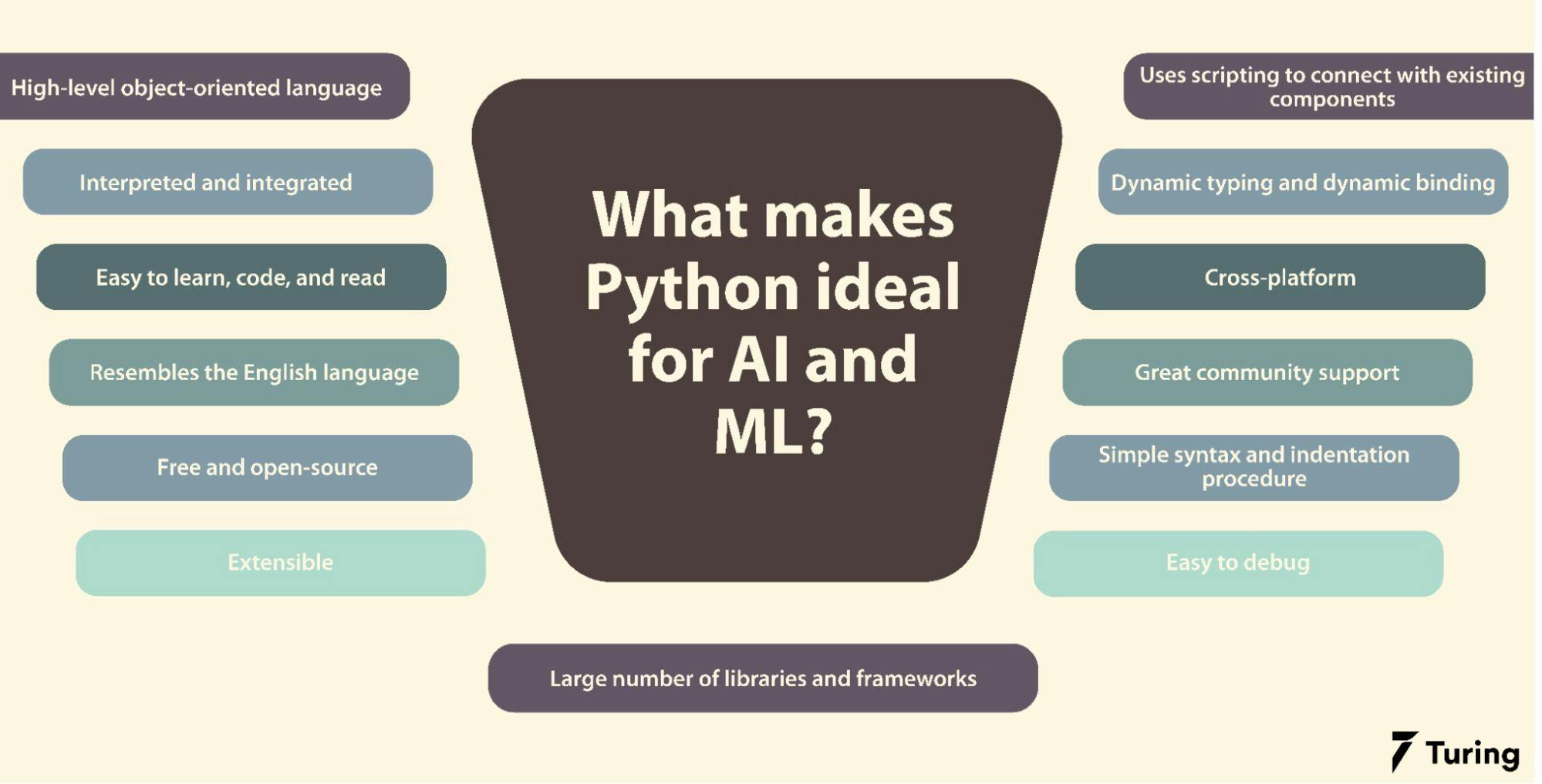
<p>Python is the most popular language for AI because it’s simple, versatile, and has powerful libraries.</p>
<p>Python is the <strong>undisputed king</strong> of AI and machine learning. While other languages like R, Java, and C++ also have their strengths, Python dominates the AI landscape—and for good reason.</p>
<figure ><figure class="post__image post__image--center"><img decoding="async" loading="lazy"  src="https://images.prismic.io/turing/65980c99531ac2845a2726e4_Role_of_Python_in_AI_and_ML_8d959ba407.webp?auto=format,compress" alt="why python" width="1999" height="1017" data-is-external-image="true"></figure>
<figcaption >Image Copyright <a href="https://www.turing.com" target="_blank" rel="nofollow noopener noreferrer">https://www.turing.com</a></figcaption>
</figure>
<p> </p>
<p>Let’s break down <strong>why Python is the best choice for AI development.</strong></p>
<h4><span style="text-decoration: underline;"><em>i. <strong>Simplicity and Readability</strong></em></span></h4>
<p>Python’s syntax is clean, simple, and easy to understand, making it beginner-friendly. AI often involves complex mathematical models and algorithms, so having a language that doesn’t add extra complexity is a huge plus.</p>
<h5>Example:</h5>
<p>Compare Python to C++ when creating a simple neural network:</p>
<p><strong>Python</strong>:</p>
<pre class="language-python line-numbers"><code>import tensorflow as tf 
model = tf.keras.Sequential([ 
  tf.keras.layers.Dense(10, activation='relu'), 
  tf.keras.layers.Dense(1) 
])</code></pre>
<p><strong>C++</strong>:<br>Would involve hundreds of lines of code for the same task, along with manual memory management.</p>
<h4><span style="text-decoration: underline;"><em>ii. <strong>Rich Ecosystem of Libraries and Frameworks</strong></em></span></h4>
<p>Python’s extensive libraries and frameworks make AI development faster and easier. These libraries handle the heavy lifting so you can focus on the logic and implementation.</p>
<ul>
<li>
<p><strong>Machine Learning</strong>:</p>
<ul>
<li><strong><a href="https://scikit-learn.org" target="_blank" rel="nofollow noopener noreferrer">Scikit-learn</a></strong>: For basic ML tasks like regression and classification.</li>
<li><strong><a href="https://xgboost.readthedocs.io/en/latest/" target="_blank" rel="nofollow noopener noreferrer">XGBoost</a></strong>: Great for decision trees and gradient boosting.</li>
</ul>
</li>
<li>
<p><strong>Deep Learning</strong>:</p>
<ul>
<li><strong><a href="https://www.tensorflow.org" target="_blank" rel="nofollow noopener noreferrer">TensorFlow</a></strong> &amp; <strong><a href="https://keras.io/getting_started/" target="_blank" rel="nofollow noopener noreferrer">Keras</a></strong>: Powerful for neural networks and deep learning.</li>
<li><strong><a href="https://pytorch.org" target="_blank" rel="nofollow noopener noreferrer">PyTorch</a></strong>: Popular for research and dynamic computational graphs.</li>
</ul>
</li>
<li>
<p><strong>Data Processing</strong>:</p>
<ul>
<li><strong><a href="https://pandas.pydata.org" target="_blank" rel="nofollow noopener noreferrer">Pandas</a></strong>: For data manipulation and analysis.</li>
<li><strong><a href="https://numpy.org" target="_blank" rel="nofollow noopener noreferrer">NumPy</a></strong>: For numerical computations.</li>
<li><strong><a href="https://matplotlib.org" target="_blank" rel="nofollow noopener noreferrer">Matplotlib</a> &amp; <a href="https://matplotlib.org" target="_blank" rel="nofollow noopener noreferrer">Seaborn</a></strong>: For data visualization.</li>
</ul>
</li>
</ul>
<h5>Example:</h5>
<pre class="language-python line-numbers"><code>import pandas as pd  
import matplotlib.pyplot as plt  

# Load data and visualize
data = pd.read_csv('data.csv')  
data['feature'].hist()  
plt.show()</code></pre>
<h4><span style="text-decoration: underline;"><em>iii. <strong>Strong Community Support</strong></em></span></h4>
<p>Python has one of the largest developer communities in the world. If you get stuck, chances are someone has already faced and solved the same problem. This means:</p>
<ul>
<li><strong>Lots of tutorials and documentation</strong>.</li>
<li><strong>Active forums</strong> (like Stack Overflow and Reddit).</li>
<li><strong>Frequent updates and improvements</strong> to libraries.</li>
</ul>
<h4><span style="text-decoration: underline;"><em>iv. <strong>Cross-Platform Compatibility</strong></em></span></h4>
<p>Python is highly portable. You can write code on one system (Windows, macOS, Linux) and run it on another with minimal changes. This makes it ideal for deploying AI models across different environments, from personal laptops to cloud servers.</p>
<h4><span style="text-decoration: underline;"><em>v. <strong>Integration with Other Technologies</strong></em></span></h4>
<p>Python easily integrates with other languages and tools. For example:</p>
<ul>
<li>Use <strong>Python APIs</strong> to connect AI models to web apps.</li>
<li>Interface with C/C++ for performance-critical parts of a project.</li>
<li>Leverage cloud services like <strong>AWS, Google Cloud</strong>, and <strong>Azure</strong> for scalable AI solutions.</li>
</ul>
<h4><em><span style="text-decoration: underline;">vi. <strong>Support for Big Data and Automation</strong></span></em></h4>
<p>AI often involves processing huge datasets. Python’s compatibility with big data frameworks like <strong>Apache Spark</strong> and automation tools like <strong>Airflow</strong> makes it perfect for handling and automating large-scale data pipelines.</p>
<h4><span style="text-decoration: underline;"><em>vii. <strong>Great for Prototyping and Experimentation</strong></em></span></h4>
<p>AI development often involves experimentation, tweaking algorithms, and testing different models. Python’s interactive nature (using tools like <strong>Jupyter Notebooks</strong>) makes prototyping fast and efficient.</p>
<h4><span style="text-decoration: underline;"><em>viii. <strong>Backed by Major Companies</strong></em></span></h4>
<p>Companies like Google, Facebook, and Microsoft actively support Python, contributing to its development and providing powerful tools and frameworks.</p>
<ul>
<li><strong>Google’s TensorFlow</strong> is built for Python.</li>
<li>Facebook’s <strong>PyTorch</strong> is also Python-first.</li>
</ul>
<h4><strong>Resources to Learn Python</strong>:</h4>
<ul>
<li><strong><a href="https://www.python.org/about/gettingstarted/">Python.org</a></strong>: Official Python documentation for beginners.</li>
<li><strong>Courses</strong>:
<ul>
<li><a href="https://www.coursera.org/specializations/python">Python for Everybody (Coursera)</a> – A beginner-friendly course by the University of Michigan.</li>
<li><a href="https://www.freecodecamp.org/learn">freeCodeCamp Python Course</a> – A free, comprehensive Python course.</li>
</ul>
</li>
<li><strong>Interactive Platforms</strong>:
<ul>
<li><a href="https://www.codecademy.com/learn/learn-python-3">Codecademy’s Python Course</a> – Learn by doing.</li>
<li><a href="https://replit.com/">Replit</a> – Practice coding directly in your browser.</li>
</ul>
</li>
</ul>
<h5><strong>Example Project</strong>:</h5>
<address class="msg--highlight msg ">Write a simple program to automate tasks, like sending personalized emails or organizing files.</address><hr>
<h3><strong>Brush Up on Math (Don’t Worry, You Can Do This)</strong></h3>
<p>AI and Machine Learning (ML) involve some math, but you don’t need to be an expert. Focus on these key areas:</p>
<ul>
<li><strong>Linear Algebra</strong>: Vectors, matrices, and matrix multiplication.</li>
<li><strong>Statistics</strong>: Understanding probabilities, distributions, and hypothesis testing.</li>
<li><strong>Calculus</strong>: Basics of derivatives and gradients (used in optimization).</li>
</ul>
<h4><strong>Resources for Learning Math</strong>:</h4>
<ul>
<li><strong>Khan Academy</strong>:
<ul>
<li><a href="https://www.khanacademy.org/math/linear-algebra">Linear Algebra Course</a></li>
<li><a href="https://www.khanacademy.org/math/statistics-probability">Probability and Statistics</a></li>
</ul>
</li>
<li><strong>YouTube Channels</strong>:
<ul>
<li><a href="https://www.youtube.com/c/3blue1brown">3Blue1Brown</a> – Visual, intuitive explanations of math concepts.</li>
<li><a href="https://www.youtube.com/c/joshstarmer">StatQuest with Josh Starmer</a> – Clear breakdowns of complex statistics concepts.</li>
</ul>
</li>
</ul>
<h5><strong>Example Project</strong>:</h5>
<address class="msg msg--highlight ">Analyze a dataset using Python libraries like NumPy and pandas to calculate averages, standard deviations, and create visualizations.</address><hr>
<h2><strong>Step 2: <span style="color: #169179;">Dive Into Machine Learning (ML)</span></strong></h2>
<p>Machine Learning is a subset of AI that focuses on teaching computers to learn from data. Start with these steps:</p>
<h3><strong>Understand ML Concepts</strong></h3>
<p>Learn about the different types of ML:</p>
<ul>
<li><strong>Supervised Learning</strong>: The model learns from labeled data (e.g., predicting house prices based on features).</li>
<li><strong>Unsupervised Learning</strong>: The model finds patterns in unlabeled data (e.g., clustering customers by behavior).</li>
<li><strong>Reinforcement Learning</strong>: The model learns through rewards and penalties (e.g., teaching a robot to walk).</li>
</ul>
<h4><strong>Recommended Courses</strong>:</h4>
<ul>
<li><a href="https://www.coursera.org/learn/machine-learning">Machine Learning by Andrew Ng (Coursera)</a> – A classic, comprehensive course.</li>
<li><a href="https://developers.google.com/machine-learning/crash-course">Google’s Machine Learning Crash Course</a> – Free and interactive.</li>
<li><a href="https://course.fast.ai/">Fast.ai’s Practical Deep Learning for Coders</a> – Focuses on practical implementation.</li>
</ul>
<h5><strong>Example Project</strong>:</h5>
<address class="msg msg--highlight ">Build a linear regression model to predict housing prices based on features like square footage and location.</address><hr>
<h3><strong>Get Hands-On with Libraries and Tools</strong></h3>
<p>Familiarize yourself with Python libraries designed for ML:</p>
<ul>
<li><strong>Scikit-Learn</strong>: Great for basic ML models like regression, classification, and clustering.</li>
<li><strong>TensorFlow and Keras</strong>: Powerful libraries for deep learning.</li>
<li><strong>PyTorch</strong>: Another popular deep learning library, known for flexibility and dynamic computation graphs.</li>
</ul>
<h4><strong>Tutorials</strong>:</h4>
<ul>
<li><a href="https://scikit-learn.org/stable/tutorial/basic/tutorial.html">Scikit-Learn Official Guide</a></li>
<li><a href="https://www.tensorflow.org/tutorials">TensorFlow Tutorials</a></li>
<li><a href="https://pytorch.org/tutorials/">PyTorch Tutorials</a></li>
</ul>
<h5><strong>Example Project</strong>:</h5>
<address class="msg msg--highlight ">Create a sentiment analysis tool that classifies movie reviews as positive or negative.</address><hr>
<h2><strong>Step 3: <span style="color: #169179;">Work on Projects and Build a Portfolio</span></strong></h2>
<p>Applying what you learn through projects is crucial. Start small and gradually tackle more complex challenges.</p>
<h3><strong>Beginner Projects</strong>:</h3>
<ul>
<li><strong>Spam Classifier</strong>: Build a model to detect spam emails.</li>
<li><strong>Simple Chatbot</strong>: Use basic NLP (Natural Language Processing) techniques to create a chatbot.</li>
</ul>
<h3><strong>Intermediate Projects</strong>:</h3>
<ul>
<li><strong>Recommendation System</strong>: Build a movie recommendation system using collaborative filtering.</li>
<li><strong>Image Classification</strong>: Train a model to classify images (e.g., cats vs. dogs).</li>
</ul>
<h3><strong>Advanced Projects</strong>:</h3>
<ul>
<li><strong>Deep Learning Models</strong>: Work on projects involving image generation, natural language processing, or reinforcement learning.</li>
</ul>
<h4>Platforms to Find Datasets and Challenges:</h4>
<ul>
<li><strong><a href="https://www.kaggle.com/">Kaggle</a></strong>: Offers datasets and ML competitions.</li>
<li><strong><a href="https://archive.ics.uci.edu/ml/index.php">UCI Machine Learning Repository</a></strong>: A collection of public datasets.</li>
<li><strong><a href="https://colab.research.google.com/">Google Colab</a></strong>: A free cloud environment to run Python code and AI models.</li>
</ul>
<hr>
<h2><strong>Step 4: <span style="color: #169179;">Stay Updated and Keep Learning</span></strong></h2>
<p>AI is a fast-moving field. Stay current by following news, research, and joining communities. Here are some tips:</p>
<ul>
<li><strong>Follow AI News</strong>: Websites like <em>Towards Data Science</em> and <em>AI Weekly</em> provide regular updates.</li>
<li><strong>Join Communities</strong>: Participate in AI forums like Reddit’s r/MachineLearning and AI-related Discord servers.</li>
<li><strong>Attend Events</strong>: Look out for online webinars and conferences.</li>
</ul>
<h3><strong>AI News and Blogs</strong>:</h3>
<ul>
<li><a href="https://towardsdatascience.com/">Towards Data Science</a></li>
<li><a href="https://aiweekly.co/">AI Weekly</a></li>
<li><a href="https://medium.com/tag/artificial-intelligence">Medium AI Publications</a></li>
</ul>
<h3><strong>Communities and Forums</strong>:</h3>
<ul>
<li><a href="https://www.reddit.com/r/MachineLearning/">Reddit’s r/MachineLearning</a></li>
<li><a href="https://stackoverflow.com/questions/tagged/machine-learning">Stack Overflow</a></li>
<li>Join Discord servers focused on AI and ML.</li>
</ul>
<hr>
<h3><strong>Conclusion</strong></h3>
<p>Learning AI in 2025 is an exciting journey with endless possibilities. By mastering Python, understanding key math concepts, exploring machine learning, and working on projects, you can build valuable skills and create innovative solutions. Stay curious, keep practicing, and embrace challenges along the way. <em><strong>The future is AI, and you’re on the right path!</strong></em></p>
            ]]>
        </content>
    </entry>
    <entry>
        <title>Average Cost Estimation for Web Design Services in Nepal</title>
        <author>
            <name>Chandan Chaurasia</name>
        </author>
        <link href="https://www.kaajoo.com.np/average-cost-estimation-for-web-design-services-in-nepal.html"/>
        <id>https://www.kaajoo.com.np/average-cost-estimation-for-web-design-services-in-nepal.html</id>
        <media:content url="https://www.kaajoo.com.np/media/posts/28/micheile-henderson-ZVprbBmT8QA-unsplash.jpg" medium="image" />

        <updated>2024-06-03T19:38:41+05:45</updated>
            <summary type="html">
                <![CDATA[
                        <img src="https://www.kaajoo.com.np/media/posts/28/micheile-henderson-ZVprbBmT8QA-unsplash.jpg" alt="" />
                    This article features detailed cost estimation in Nepali currency (NPR) for website design, development, branding and rebranding which may also include logo design, color palettes generation and color guides, typography selection, usage and guide, and social media posts involving post guidelines, brand usage in posts and marketing guides. Prices can&hellip;
                ]]>
            </summary>
        <content type="html">
            <![CDATA[
                    <p><img src="https://www.kaajoo.com.np/media/posts/28/micheile-henderson-ZVprbBmT8QA-unsplash.jpg" class="type:primaryImage" alt="" /></p>
                <p class="msg msg--highlight  msg--success">This article features detailed cost estimation in Nepali currency (NPR) for website design, development, branding and rebranding which may also include logo design, color palettes generation and color guides, typography selection, usage and guide, and social media posts involving post guidelines, brand usage in posts and marketing guides. Prices can vary significantly based on the <strong>complexity of the project, the experience of the designer, and the specific requirements</strong> of the client. The prices mentioned in the article are basically for <strong>small to medium sized businesses</strong> that need digital and web presence with affordable cost structure.</p>
<p>Below are typical <strong>cost ranges</strong> for these services for <strong>small to medium sized businesses</strong> based on market research and industry standards in Nepal.</p>
<h3>Cost Estimation for Design Services in Nepal</h3>
<h3>1. Logo Design</h3>
<p><strong>Basic Logo Design:</strong></p>
<ul>
<li>Initial Concepts (2-3): NPR 5,000 - NPR 10,000</li>
<li>Revisions (up to 2): NPR 2,000 - NPR 5,000</li>
<li>Final Logo Files (JPEG, PNG, SVG): NPR 3,000 - NPR 5,000</li>
<li><strong>Total: NPR 10,000 - NPR 20,000</strong></li>
</ul>
<p><strong>Advanced Logo Design:</strong></p>
<ul>
<li>Initial Concepts (4-6): NPR 10,000 - NPR 20,000</li>
<li>Revisions (up to 5): NPR 5,000 - NPR 10,000</li>
<li>Final Logo Files (JPEG, PNG, SVG, EPS, AI): NPR 5,000 - NPR 10,000</li>
<li>Brand Guide (logo usage, variations): NPR 5,000 - NPR 10,000</li>
<li><strong>Total: NPR 25,000 - NPR 50,000</strong></li>
</ul>
<h3>2. Color Palettes and Guides</h3>
<p><strong>Basic Color Palette:</strong></p>
<ul>
<li>Initial Color Options (2-3): NPR 2,000 - NPR 5,000</li>
<li>Final Color Palette (Primary, Secondary, Tertiary): NPR 3,000 - NPR 5,000</li>
<li><strong>Total: NPR 5,000 - NPR 10,000</strong></li>
</ul>
<p><strong>Detailed Color Scheme:</strong></p>
<ul>
<li>Initial Color Options (4-6): NPR 5,000 - NPR 10,000</li>
<li>Final Color Palette with Variations: NPR 5,000 - NPR 10,000</li>
<li>Color Guide (usage for web, print): NPR 5,000 - NPR 10,000</li>
<li><strong>Total: NPR 15,000 - NPR 30,000</strong></li>
</ul>
<h3>3. Typography</h3>
<p><strong>Basic Typography Selection:</strong></p>
<ul>
<li>Initial Font Options (2-3 pairs): NPR 2,000 - NPR 5,000</li>
<li>Final Typography Selection: NPR 3,000 - NPR 5,000</li>
<li><strong>Total: NPR 5,000 - NPR 10,000</strong></li>
</ul>
<p><strong>Detailed Typography Guide:</strong></p>
<ul>
<li>Initial Font Options (4-6 pairs): NPR 5,000 - NPR 10,000</li>
<li>Final Typography Selection: NPR 5,000 - NPR 10,000</li>
<li>Typography Guide (usage, hierarchy, pairing): NPR 5,000 - NPR 10,000</li>
<li><strong>Total: NPR 15,000 - NPR 30,000</strong></li>
</ul>
<h3>4. Social Media Posts</h3>
<p><strong>Single Post Design:</strong></p>
<ul>
<li>Basic Post (static image): NPR 1,000 - NPR 1,500</li>
<li>Advanced Post (animation, interactive elements): NPR 1,500 - NPR 2,500</li>
<li><strong>Total per post: NPR 1,000 - NPR 2,500</strong></li>
</ul>
<p><strong>Monthly Package (15-20 posts):</strong></p>
<ul>
<li>Basic Posts (static images, 15 posts): NPR 15,000 - NPR 22,500</li>
<li>Advanced Posts (including some animations, 15 posts): NPR 22,500 - NPR 37,500</li>
<li><strong>Total for 15 posts: NPR 15,000 - NPR 37,500</strong></li>
<li><strong>Total for 20 posts: NPR 20,000 - NPR 50,000</strong></li>
</ul>
<h3>5. Intern Mentorship</h3>
<p><strong>Weekly 2-3 Hours Mentorship:</strong></p>
<ul>
<li>Mid-level Professional Mentorship: NPR 1,000 - NPR 2,000 per hour</li>
<li>Weekly Charge (2-3 hours): NPR 2,000 - NPR 6,000</li>
<li>Monthly Charge (4 weeks): NPR 8,000 - NPR 24,000</li>
</ul>
<h3>6. Web Design and Rebranding</h3>
<p><strong>Basic Web Design:</strong></p>
<ul>
<li>Single Page Website: NPR 20,000 - NPR 40,000</li>
<li>Multi-Page Website (up to 5 pages): NPR 50,000 - NPR 80,000</li>
<li><strong>Total: NPR 20,000 - NPR 80,000</strong></li>
</ul>
<p><strong>Advanced Web Design:</strong></p>
<ul>
<li>Multi-Page Website (more than 5 pages): NPR 80,000 - NPR 150,000</li>
<li>E-commerce Website: NPR 150,000 - NPR 300,000</li>
<li>Custom Features (CMS, API integration, etc.): NPR 20,000 - NPR 50,000</li>
<li><strong>Total: NPR 100,000 - NPR 350,000</strong></li>
</ul>
<p><strong>Website Rebranding:</strong></p>
<ul>
<li>Content Update: NPR 10,000 - NPR 30,000</li>
<li>Design Overhaul (UI/UX improvements): NPR 40,000 - NPR 100,000</li>
<li>SEO Optimization: NPR 20,000 - NPR 50,000</li>
<li><strong>Total: NPR 70,000 - NPR 180,000</strong></li>
</ul>
<hr>
<h3>Comprehensive Branding Packages</h3>
<p><strong>Basic Package:</strong></p>
<ul>
<li>Logo Design: NPR 15,000 (average)</li>
<li>Color Palette: NPR 7,500 (average)</li>
<li>Typography: NPR 7,500 (average)</li>
<li>Social Media Posts (15 posts): NPR 20,000 (average)</li>
<li>Intern Mentorship (monthly): NPR 12,000 (average)</li>
<li>Basic Web Design: NPR 50,000 (average)</li>
<li><strong>Total: <span style="color: #169179;">NPR 112,000</span> (average)</strong></li>
</ul>
<p><strong>Advanced Package:</strong></p>
<ul>
<li>Logo Design: NPR 37,500 (average)</li>
<li>Color Palette: NPR 22,500 (average)</li>
<li>Typography: NPR 22,500 (average)</li>
<li>Social Media Posts (20 posts): NPR 45,000 (average)</li>
<li>Intern Mentorship (monthly): NPR 16,000 (average)</li>
<li>Advanced Web Design: NPR 200,000 (average)</li>
<li>Website Rebranding: NPR 125,000 (average)</li>
<li><strong>Total: <span style="color: #169179;">NPR 468,500</span> (average)</strong></li>
</ul>
<blockquote>
<p><span style="text-decoration: underline;"><em>Let's provide an example breakdown for both a basic and an advanced package, including specific elements and their associated costs in Nepali currency (NPR). This will give a clearer picture of what each package entails.</em></span></p>
</blockquote>
<h3>Example Breakdown: Basic Package</h3>
<ol>
<li>
<p><strong>Logo Design</strong></p>
<ul>
<li>Initial Concepts (2-3): NPR 7,000</li>
<li>Revisions (up to 2): NPR 3,000</li>
<li>Final Logo Files: NPR 5,000</li>
<li><strong>Total: NPR 15,000</strong></li>
</ul>
</li>
<li>
<p><strong>Color Palettes</strong></p>
<ul>
<li>Initial Color Options (2-3): NPR 3,000</li>
<li>Final Color Palette: NPR 4,500</li>
<li><strong>Total: NPR 7,500</strong></li>
</ul>
</li>
<li>
<p><strong>Typography</strong></p>
<ul>
<li>Initial Font Options (2-3 pairs): NPR 3,000</li>
<li>Final Typography Selection: NPR 4,500</li>
<li><strong>Total: NPR 7,500</strong></li>
</ul>
</li>
<li>
<p><strong>Social Media Posts</strong></p>
<ul>
<li>15 Basic Posts: NPR 20,000</li>
<li><strong>Total: NPR 20,000</strong></li>
</ul>
</li>
<li>
<p><strong>Intern Mentorship</strong></p>
<ul>
<li>Weekly 2-3 Hours (4 weeks): NPR 12,000</li>
<li><strong>Total: NPR 12,000</strong></li>
</ul>
</li>
<li>
<p><strong>Basic Web Design</strong></p>
<ul>
<li>Multi-Page Website (up to 5 pages): NPR 50,000</li>
<li><strong>Total: NPR 50,000</strong></li>
</ul>
</li>
</ol>
<p><strong>Overall Total average for Basic Package: <span style="color: #169179;">NPR 112,000</span></strong></p>
<hr>
<h3>Example Breakdown: Advanced Package</h3>
<ol>
<li>
<p><strong>Logo Design</strong></p>
<ul>
<li>Initial Concepts (4-6): NPR 15,000</li>
<li>Revisions (up to 5): NPR 10,000</li>
<li>Final Logo Files: NPR 7,500</li>
<li>Brand Guide: NPR 5,000</li>
<li><strong>Total: NPR 37,500</strong></li>
</ul>
</li>
<li>
<p><strong>Color Palettes</strong></p>
<ul>
<li>Initial Color Options (4-6): NPR 7,500</li>
<li>Final Color Palette with Variations: NPR 7,500</li>
<li>Color Guide: NPR 7,500</li>
<li><strong>Total: NPR 22,500</strong></li>
</ul>
</li>
<li>
<p><strong>Typography</strong></p>
<ul>
<li>Initial Font Options (4-6 pairs): NPR 7,500</li>
<li>Final Typography Selection: NPR 7,500</li>
<li>Typography Guide: NPR 7,500</li>
<li><strong>Total: NPR 22,500</strong></li>
</ul>
</li>
<li>
<p><strong>Social Media Posts</strong></p>
<ul>
<li>20 Advanced Posts: NPR 45,000</li>
<li><strong>Total: NPR 45,000</strong></li>
</ul>
</li>
<li>
<p><strong>Intern Mentorship</strong></p>
<ul>
<li>Weekly 2-3 Hours (4 weeks): NPR 16,000</li>
<li><strong>Total: NPR 16,000</strong></li>
</ul>
</li>
<li>
<p><strong>Advanced Web Design</strong></p>
<ul>
<li>Multi-Page Website (more than 5 pages): NPR 120,000</li>
<li>Custom Features: NPR 30,000</li>
<li><strong>Total: NPR 150,000</strong></li>
</ul>
</li>
<li>
<p><strong>Website Rebranding</strong></p>
<ul>
<li>Content Update: NPR 20,000</li>
<li>Design Overhaul: NPR 70,000</li>
<li>SEO Optimization: NPR 35,000</li>
<li><strong>Total: NPR 125,000</strong></li>
</ul>
</li>
</ol>
<p><strong>Overall Total average for Advanced Package: <span style="color: #169179;">NPR 418,500 </span></strong></p>
<p>The updated detailed breakdown above now includes costs for web design and rebranding, providing a comprehensive overview of the expenses involved in website branding and rebranding in Nepal. </p>
<h3>Summary</h3>
<h4>Basic Package: NPR 112,000</h4>
<ul>
<li>Logo Design: NPR 15,000</li>
<li>Color Palettes: NPR 7,500</li>
<li>Typography: NPR 7,500</li>
<li>Social Media Posts (15 posts): NPR 20,000</li>
<li>Intern Mentorship: NPR 12,000</li>
<li>Basic Web Design: NPR 50,000</li>
</ul>
<h4>Advanced Package: NPR 418,500</h4>
<ul>
<li>Logo Design: NPR 37,500</li>
<li>Color Palettes: NPR 22,500</li>
<li>Typography: NPR 22,500</li>
<li>Social Media Posts (20 posts): NPR 45,000</li>
<li>Intern Mentorship: NPR 16,000</li>
<li>Advanced Web Design: NPR 150,000</li>
<li>Website Rebranding: NPR 125,000</li>
</ul>
<p>This detailed example breakdown above gives a clear idea of the specific costs associated with each element in both a basic and an advanced package for <strong>website design/development along with branding and rebranding in Nepal</strong>. </p>
<h3>Additional Considerations</h3>
<ol>
<li><strong>Freelancer vs. Agency</strong>: Agencies may charge more but offer comprehensive and cohesive services, including strategy and implementation.</li>
<li><strong>Revisions and Iterations</strong>: The number of revisions can impact the final cost. Ensure the number of revisions included in the initial quote.</li>
<li><strong>Project Timeline</strong>: Expedited timelines may incur additional costs.</li>
<li><strong>Scope and Complexity</strong>: The complexity of the design elements and the level of detail required will affect pricing.</li>
</ol>
<p>This comprehensive estimate covers all the major aspects of branding and digital presence. Adjustments can be made based on specific needs and the scope of the project.</p>
<p><strong>For precise quotes, it is advisable to contact local designers or agencies with your specific requirements.</strong></p>
            ]]>
        </content>
    </entry>
    <entry>
        <title>Exploring Component-Based Architectures: HTML Web Components vs React Components vs Angular Components</title>
        <author>
            <name>Kaajoo Admin</name>
        </author>
        <link href="https://www.kaajoo.com.np/exploring-component-based-architectures-html-web-components-vs-react-components-vs-angular-components.html"/>
        <id>https://www.kaajoo.com.np/exploring-component-based-architectures-html-web-components-vs-react-components-vs-angular-components.html</id>
        <media:content url="https://www.kaajoo.com.np/media/posts/26/karl-pawlowicz-QUHuwyNgSA0-unsplash.jpg" medium="image" />
            <category term="Tutorials"/>

        <updated>2023-12-18T10:22:56+05:45</updated>
            <summary type="html">
                <![CDATA[
                        <img src="https://www.kaajoo.com.np/media/posts/26/karl-pawlowicz-QUHuwyNgSA0-unsplash.jpg" alt="" />
                    Creating a comprehensive comparison between HTML Web Components, React Components, and Angular Components involves various aspects such as syntax, features, and usage. Below is an article that provides an overview and includes a simple demo for each type of component. In modern web development, component-based architectures have become a cornerstone&hellip;
                ]]>
            </summary>
        <content type="html">
            <![CDATA[
                    <p><img src="https://www.kaajoo.com.np/media/posts/26/karl-pawlowicz-QUHuwyNgSA0-unsplash.jpg" class="type:primaryImage" alt="" /></p>
                <p class="dropcap">Creating a comprehensive comparison between HTML Web Components, React Components, and Angular Components involves various aspects such as syntax, features, and usage. Below is an article that provides an overview and includes a simple demo for each type of component.</p>
<h3>Introduction:</h3>
<p>In modern web development, component-based architectures have become a cornerstone for building scalable and maintainable applications. In this article, we'll explore three popular approaches to creating components: <strong>HTML Web Components, React Components, and Angular Components</strong>. Each approach has its strengths and use cases, and we'll compare them through practical examples.</p>
<h3>1. HTML Web Components:</h3>
<p>HTML Web Components are a set of web standards that enable the creation of reusable and encapsulated components. They consist of three main technologies:</p>
<ol style="list-style-type: lower-alpha;">
<li>Custom Elements</li>
<li>Shadow DOM, and</li>
<li>HTML Templates.</li>
</ol>
<h4>Custom Elements:</h4>
<p>Custom Elements allow developers to define their own HTML elements with their desired behavior. Let's create a simple custom element called "my-button."</p>
<pre class="language-html line-numbers"><code>&lt;!DOCTYPE html&gt;
&lt;html lang="en"&gt;
&lt;head&gt;
  &lt;meta charset="UTF-8"&gt;
  &lt;meta name="viewport" content="width=device-width, initial-scale=1.0"&gt;
  &lt;title&gt;HTML Web Components Demo&lt;/title&gt;
&lt;/head&gt;
&lt;body&gt;
  &lt;my-button&gt;&lt;/my-button&gt;

  &lt;script&gt;
    class MyButton extends HTMLElement {
      connectedCallback() {
        this.innerHTML = '&lt;button&gt;Click me&lt;/button&gt;';
      }
    }

    customElements.define('my-button', MyButton);
  &lt;/script&gt;
&lt;/body&gt;
&lt;/html&gt;
</code></pre>
<h3>2. React Components:</h3>
<p>React is a JavaScript library for building user interfaces, and its components are a fundamental part of the framework. Here's a simple React component that serves as a button:</p>
<pre class="language-jsx line-numbers"><code>import React from 'react';

class MyButton extends React.Component {
  render() {
    return &lt;button&gt;Click me&lt;/button&gt;;
  }
}

export default MyButton;
</code></pre>
<h3>3. Angular Components:</h3>
<p>Angular is a full-fledged framework that uses TypeScript to build web applications. Angular components are the building blocks of Angular applications. Below is an example of an Angular component:</p>
<pre class="language-typescript line-numbers"><code>import { Component } from '@angular/core';

@Component({
  selector: 'app-my-button',
  template: '&lt;button&gt;Click me&lt;/button&gt;',
})
export class MyButtonComponent {}
</code></pre>
<h3>Demo:</h3>
<p>Now, let's compare the usage of these components in a simple web page.</p>
<pre class="language-html line-numbers"><code>&lt;!DOCTYPE html&gt;
&lt;html lang="en"&gt;
&lt;head&gt;
  &lt;meta charset="UTF-8"&gt;
  &lt;meta name="viewport" content="width=device-width, initial-scale=1.0"&gt;
  &lt;title&gt;Component Comparison Demo&lt;/title&gt;
&lt;/head&gt;
&lt;body&gt;
  &lt;!-- HTML Web Component --&gt;
  &lt;my-button&gt;&lt;/my-button&gt;

  &lt;!-- React Component --&gt;
  &lt;div id="react-root"&gt;&lt;/div&gt;
  &lt;script src="react.bundle.js"&gt;&lt;/script&gt;
  &lt;script&gt;
    const element = React.createElement(MyButton);
    ReactDOM.render(element, document.getElementById('react-root'));
  &lt;/script&gt;

  &lt;!-- Angular Component --&gt;
  &lt;app-my-button&gt;&lt;/app-my-button&gt;
  &lt;script src="angular.bundle.js"&gt;&lt;/script&gt;
&lt;/body&gt;
&lt;/html&gt;
</code></pre>
<div class="flex-1 overflow-hidden">
<div class="react-scroll-to-bottom--css-icqyq-79elbk h-full">
<div class="react-scroll-to-bottom--css-icqyq-1n7m0yu">
<div class="flex flex-col pb-9 text-sm">
<div class="w-full text-token-text-primary" data-testid="conversation-turn-3">
<div class="px-4 py-2 justify-center text-base md:gap-6 m-auto">
<div class="flex flex-1 text-base mx-auto gap-3 md:px-5 lg:px-1 xl:px-5 md:max-w-3xl lg:max-w-[40rem] xl:max-w-[48rem] group final-completion">
<div class="relative flex w-full flex-col lg:w-[calc(100%-115px)] agent-turn">
<div class="flex-col gap-1 md:gap-3">
<div class="flex flex-grow flex-col max-w-full">
<div class="min-h-[20px] text-message flex flex-col items-start gap-3 whitespace-pre-wrap break-words [.text-message+&amp;]:mt-5 overflow-x-auto" data-message-author-role="assistant" data-message-id="57c312ca-0467-4faf-8bdb-288f7e2439f0">
<div class="markdown prose w-full break-words dark:prose-invert dark">
<h3>Conclusion:</h3>
<p>In this article, we explored three different approaches to creating components in web development: HTML Web Components, React Components, and Angular Components. Each approach has its advantages and use cases, and the choice depends on factors such as project requirements, team expertise, and ecosystem preferences. While HTML Web Components leverage web standards, React and Angular offer powerful ecosystems with additional features like state management and routing. As a developer, understanding the strengths of each approach empowers you to choose the right tool for the job.</p>
</div>
</div>
</div>
</div>
</div>
</div>
</div>
</div>
</div>
</div>
</div>
</div>
            ]]>
        </content>
    </entry>
    <entry>
        <title>How to use Figma effectively for better design handoff</title>
        <author>
            <name>Chandan Chaurasia</name>
        </author>
        <link href="https://www.kaajoo.com.np/use-figma-effectively-for-design-handoff-follow-these-best-practices.html"/>
        <id>https://www.kaajoo.com.np/use-figma-effectively-for-design-handoff-follow-these-best-practices.html</id>
        <media:content url="https://www.kaajoo.com.np/media/posts/21/olaf-val-UTk9cXzYWAg-unsplash.jpg" medium="image" />
            <category term="UI UX"/>
            <category term="How to"/>
            <category term="Design"/>

        <updated>2023-12-16T00:03:00+05:45</updated>
            <summary type="html">
                <![CDATA[
                        <img src="https://www.kaajoo.com.np/media/posts/21/olaf-val-UTk9cXzYWAg-unsplash.jpg" alt="figma design handoff" />
                    Figma is a cloud-based design and prototyping tool used for creating user interfaces (UI) and user experience (UX) designs. It was developed by the company Figma Inc. and was first released in 2016. Figma is widely popular among designers and design teams due to its collaborative features and ease of&hellip;
                ]]>
            </summary>
        <content type="html">
            <![CDATA[
                    <p><img src="https://www.kaajoo.com.np/media/posts/21/olaf-val-UTk9cXzYWAg-unsplash.jpg" class="type:primaryImage" alt="figma design handoff" /></p>
                <p>Figma is a cloud-based design and prototyping tool used for creating user interfaces (UI) and user experience (UX) designs. It was developed by the company Figma Inc. and was first released in 2016. Figma is widely popular among designers and design teams due to its collaborative features and ease of use.</p>
<h3><strong>Here are some key features and aspects of Figma:</strong></h3>
<ol>
<li>
<p><strong>Cloud-based and Cross-platform:</strong> Figma operates entirely in the cloud, which means you can access your design projects from any computer with an internet connection. It supports both Windows and macOS platforms, allowing designers to work seamlessly across different operating systems.</p>
</li>
<li>
<p><strong>Real-time Collaboration:</strong> One of Figma's standout features is its ability to facilitate real-time collaboration. Multiple designers can work on the same design file simultaneously, making it ideal for remote teams or designers who need to collaborate with clients or stakeholders. This feature allows for easy feedback, comments, and iteration, improving the overall design process.</p>
</li>
<li>
<p><strong>Vector Editing and Prototyping:</strong> Figma provides a powerful set of vector editing tools that enable designers to create and modify UI designs with precision. It offers a variety of shape and text tools, as well as the ability to create and manage components and styles for consistent design systems. Figma also allows designers to create interactive prototypes, which can be shared with stakeholders or used for usability testing.</p>
</li>
<li>
<p><strong>Design Libraries and Version Control:</strong> Figma supports design libraries, which are collections of reusable components and styles. Designers can create and maintain a centralized design system, making it easier to ensure consistency across projects and collaborate efficiently. Figma also offers version control, allowing designers to revert to previous versions of their designs or compare changes made by different team members.</p>
</li>
<li>
<p><strong>Third-party Integrations:</strong> Figma integrates with various third-party tools and services, such as Slack, Jira, Zeplin, and many others. These integrations enable designers to streamline their workflow by connecting Figma with other tools they use for project management, handoff, or development.</p>
</li>
<li>
<p><strong>Plugins and Extensions:</strong> Figma has a robust plugin ecosystem that allows designers to extend its functionality. Plugins can automate repetitive tasks, enhance the design process, or integrate with external services. With a wide range of plugins available, designers can customize their workflow and access additional features within Figma.</p>

</li>
</ol>
<p>Overall, Figma has gained popularity for its collaborative capabilities, cross-platform accessibility, and comprehensive design features. It has become a preferred choice for many designers and design teams, from small startups to large enterprises, for creating UI/UX designs efficiently and effectively.</p>
<div class="w-full text-token-text-primary" data-testid="conversation-turn-5">
<div class="px-4 py-2 justify-center text-base md:gap-6 m-auto">
<div class="flex flex-1 text-base mx-auto gap-3 md:px-5 lg:px-1 xl:px-5 md:max-w-3xl lg:max-w-[40rem] xl:max-w-[48rem] group final-completion">
<div class="relative flex w-full flex-col lg:w-[calc(100%-115px)] agent-turn">
<div class="flex-col gap-1 md:gap-3">
<div class="flex flex-grow flex-col max-w-full">
<div class="min-h-[20px] text-message flex flex-col items-start gap-3 whitespace-pre-wrap break-words [.text-message+&amp;]:mt-5 overflow-x-auto" data-message-author-role="assistant" data-message-id="c2c109ce-89f3-4ab5-b92b-7cbb37d5faac">
<div class="markdown prose w-full break-words dark:prose-invert dark">
<blockquote>
<p class="msg msg--success msg--highlight    ">Because developers have unique approaches to work, thinking, and coding, there's no universally perfect handoff document. The emphasis should shift towards establishing a handoff process that may not be flawless but remains effective and practical.</p>
</blockquote>
</div>
</div>
</div>
</div>
</div>
</div>
</div>
</div>
<h3><strong>Best Practices</strong></h3>
<ol>
<li>
<p><strong>Organize your design files: </strong>Create a structured file organization system using pages, frames, and layers. Use meaningful names for your pages and frames, and group related elements together in layers. This will make it easier for developers to navigate and understand your design files.</p>
</li>
<li>
<p><strong>Use styles and components: </strong>Utilize Figma's styles and components feature to maintain design consistency and make it easier to update multiple instances of the same element. Create a style guide with reusable styles and components for typography, colors, buttons, icons, and other UI elements. This will ensure that developers have access to the correct design specifications.P</p>
</li>
<li>
<p><strong>Document design decisions: </strong>Include annotations, notes, or comments to explain the rationale behind certain design decisions. This information will provide developers with context and help them understand the purpose and functionality of specific elements or interactions.</p>
</li>
<li>
<p><strong>Generate design specs: </strong>Figma allows you to generate design specs automatically, which provide detailed measurements, spacing, colors, and assets. Ensure that all the necessary information for development is included in the design specs. Developers can access these specs directly within Figma or export them as PDFs or other formats.</p>
</li>
<li>
<p><strong>Provide interactive prototypes: </strong>Create interactive prototypes in Figma to demonstrate the flow and functionality of your designs. This allows developers to better understand the user experience and interactions. Use Figma's prototyping features to link screens together, define interactions, and add animations.</p>
</li>
<li>
<p><strong>Collaborate effectively: </strong>Use Figma's collaboration features to work together with developers. Share design files and prototypes with the development team and gather their feedback. Encourage communication and address any questions or concerns they may have.</p>
</li>
<li>
<p><strong>Keep designs up to date: </strong>As your designs evolve, make sure to keep your Figma files updated. If any changes or iterations are made, communicate them clearly to the developers. This will help avoid confusion and ensure that everyone is working with the latest design version.</p>
</li>
<li>
<p><strong>Use developer-friendly tools: </strong>Figma integrates with various developer-friendly tools like Zeplin, Avocode, and others. Explore these integrations to streamline the design handoff process. These tools provide developers with direct access to design assets, specifications, and code snippets.</p>
</li>
</ol>
<p>By following these tips, you can enhance the efficiency and clarity of your design handoff process using Figma.</p>
<p>Design handoff is a crucial phase in the design process, where designers transfer their work to developers for implementation. Figma is a popular design tool that facilitates collaboration between designers and developers.</p>
<p><strong>Here are step-by-step instructions for a design handoff using Figma:</strong></p>
<h3>1. <strong>Organize Your Figma File:</strong></h3>
<ul>
<li>Group and name layers logically.</li>
<li>Use frames to organize different sections of your design.</li>
<li>Create separate pages for different screens or states.<br>
<figure ><figure class="post__image post__image--center"><img decoding="async" loading="lazy"  src="https://www.kaajoo.com.np/media/posts/21/Screen-Shot-2023-12-16-at-12.54.06-PM.png" alt="figma layer group " width="395" height="661" sizes="(max-width: 48em) 100vw, 768px" srcset="https://www.kaajoo.com.np/media/posts/21/responsive/Screen-Shot-2023-12-16-at-12.54.06-PM-xs.png 300w ,https://www.kaajoo.com.np/media/posts/21/responsive/Screen-Shot-2023-12-16-at-12.54.06-PM-sm.png 480w ,https://www.kaajoo.com.np/media/posts/21/responsive/Screen-Shot-2023-12-16-at-12.54.06-PM-md.png 768w ,https://www.kaajoo.com.np/media/posts/21/responsive/Screen-Shot-2023-12-16-at-12.54.06-PM-lg.png 1024w ,https://www.kaajoo.com.np/media/posts/21/responsive/Screen-Shot-2023-12-16-at-12.54.06-PM-xl.png 1360w ,https://www.kaajoo.com.np/media/posts/21/responsive/Screen-Shot-2023-12-16-at-12.54.06-PM-2xl.png 1600w"></figure>
<figcaption >Figma layer panel</figcaption>
</figure>
</li>
</ul>
<h3>2. <strong>Set Design Specifications:</strong></h3>
<ul>
<li>Use Figma's "Design" tab to set specifications for elements.</li>
<li>Specify colors, typography, and spacing.</li>
</ul>
<h3>3. <strong>Create Design Components:</strong></h3>
<ul>
<li>Turn design elements into components for consistency.</li>
<li>Use Figma's "Components" feature to create reusable UI elements.</li>
</ul>
<h3>4. <strong>Prepare Assets:</strong></h3>
<ul>
<li>Export assets at the required resolutions.</li>
<li>Create separate export slices for icons, images, and other assets.</li>
</ul>
<h3>5. <strong>Generate Design Specs:</strong></h3>
<ul>
<li>Use Figma's "Inspect" feature to generate design specs.</li>
<li>Specify measurements, colors, and export assets.</li>
</ul>
<h3>6. <strong>Add Comments and Annotations:</strong></h3>
<ul>
<li>Use Figma's commenting feature to provide additional context.</li>
<li>Add annotations to highlight specific details.</li>
</ul>
<h3>7. <strong>Create Prototypes:</strong></h3>
<ul>
<li>If applicable, create interactive prototypes to showcase user flows.</li>
<li>Link screens together and set interactions using Figma's prototyping features.</li>
</ul>
<h3>8. <strong>Share Figma File:</strong></h3>
<ul>
<li>Share the Figma file with developers using the "Share" option.</li>
<li>Provide view or edit access based on the team's needs.<br>
<figure ><figure class="post__image post__image--center"><img decoding="async" loading="lazy"  src="https://www.kaajoo.com.np/media/posts/21/Screen-Shot-2023-12-16-at-1.10.24-PM.png" alt="figma share tool" width="551" height="407" sizes="(max-width: 48em) 100vw, 768px" srcset="https://www.kaajoo.com.np/media/posts/21/responsive/Screen-Shot-2023-12-16-at-1.10.24-PM-xs.png 300w ,https://www.kaajoo.com.np/media/posts/21/responsive/Screen-Shot-2023-12-16-at-1.10.24-PM-sm.png 480w ,https://www.kaajoo.com.np/media/posts/21/responsive/Screen-Shot-2023-12-16-at-1.10.24-PM-md.png 768w ,https://www.kaajoo.com.np/media/posts/21/responsive/Screen-Shot-2023-12-16-at-1.10.24-PM-lg.png 1024w ,https://www.kaajoo.com.np/media/posts/21/responsive/Screen-Shot-2023-12-16-at-1.10.24-PM-xl.png 1360w ,https://www.kaajoo.com.np/media/posts/21/responsive/Screen-Shot-2023-12-16-at-1.10.24-PM-2xl.png 1600w"></figure>
<figcaption >Figma share tool</figcaption>
</figure>
</li>
</ul>
<h3>9. <strong>Collaborate in Real-Time:</strong></h3>
<ul>
<li>Encourage developers to ask questions or seek clarification directly in Figma.</li>
<li>Use Figma's real-time collaboration features for seamless communication.</li>
</ul>
<h3>10. <strong>Version Control:</strong></h3>
<ul>
<li>Leverage Figma's version history to track changes. Save your design to <strong><em>Version History</em></strong> and you can access this from <strong><em>File &gt; Show Version History</em></strong></li>
<li>Communicate any significant updates to the development team.<br>
<figure ><figure class="post__image post__image--center"><img decoding="async" loading="lazy"  src="https://www.kaajoo.com.np/media/posts/21/Screen-Shot-2023-12-16-at-12.49.18-PM.png" alt="figma version control history" width="649" height="296" sizes="(max-width: 48em) 100vw, 768px" srcset="https://www.kaajoo.com.np/media/posts/21/responsive/Screen-Shot-2023-12-16-at-12.49.18-PM-xs.png 300w ,https://www.kaajoo.com.np/media/posts/21/responsive/Screen-Shot-2023-12-16-at-12.49.18-PM-sm.png 480w ,https://www.kaajoo.com.np/media/posts/21/responsive/Screen-Shot-2023-12-16-at-12.49.18-PM-md.png 768w ,https://www.kaajoo.com.np/media/posts/21/responsive/Screen-Shot-2023-12-16-at-12.49.18-PM-lg.png 1024w ,https://www.kaajoo.com.np/media/posts/21/responsive/Screen-Shot-2023-12-16-at-12.49.18-PM-xl.png 1360w ,https://www.kaajoo.com.np/media/posts/21/responsive/Screen-Shot-2023-12-16-at-12.49.18-PM-2xl.png 1600w"></figure>
<figcaption >Figma Version History</figcaption>
</figure>
</li>
</ul>
<h3>11. <strong>Consider Developer Handoff Tools:</strong></h3>
<ul>
<li>Explore third-party tools like Zeplin or Avocode for more detailed design-to-code handoff.</li>
<li>You can also use Figma's built-in Dev Mode which is like a browser inspector for your design file, and it brings design concepts—shapes, layers, and groups—closer to developer concepts like code, icons, and tokens.<br><video loading="lazy" width="100%" height="auto" src="https://res.cloudinary.com/chandan/video/upload/v1702712984/2a32995868b3c48e1ce6d97d0cfb7374dd315850_shww3j.mp4" autoplay="autoplay" playsinline="" muted="" loop="loop"></video></li>
</ul>
<h3>12. <strong>Provide User Flows and Interactions:</strong></h3>
<ul>
<li>Clearly define user flows and interactions using Figma prototypes.</li>
<li>Highlight any animations or dynamic elements.</li>
</ul>
<h3>13. <strong>Conduct a Handoff Meeting:</strong></h3>
<ul>
<li>Schedule a meeting to go over the design with the development team.</li>
<li>Address any questions or concerns and ensure clarity on the design intent.</li>
</ul>
<h3>14. <strong>Collect Feedback:</strong></h3>
<ul>
<li>Encourage developers to provide feedback on the design.</li>
<li>Iterate on the design based on developer input if necessary.<br>
<figure ><figure class="post__image post__image--center"><img decoding="async" loading="lazy"  src="https://www.kaajoo.com.np/media/posts/21/Screen-Shot-2023-12-16-at-1.06.01-PM.png" alt="figma comment tool" width="611" height="572" sizes="(max-width: 48em) 100vw, 768px" srcset="https://www.kaajoo.com.np/media/posts/21/responsive/Screen-Shot-2023-12-16-at-1.06.01-PM-xs.png 300w ,https://www.kaajoo.com.np/media/posts/21/responsive/Screen-Shot-2023-12-16-at-1.06.01-PM-sm.png 480w ,https://www.kaajoo.com.np/media/posts/21/responsive/Screen-Shot-2023-12-16-at-1.06.01-PM-md.png 768w ,https://www.kaajoo.com.np/media/posts/21/responsive/Screen-Shot-2023-12-16-at-1.06.01-PM-lg.png 1024w ,https://www.kaajoo.com.np/media/posts/21/responsive/Screen-Shot-2023-12-16-at-1.06.01-PM-xl.png 1360w ,https://www.kaajoo.com.np/media/posts/21/responsive/Screen-Shot-2023-12-16-at-1.06.01-PM-2xl.png 1600w"></figure>
<figcaption >Commenting and adding feedback in Figma file. </figcaption>
</figure>
</li>
</ul>
<h3>15. <strong>Document Design Guidelines:</strong></h3>
<ul>
<li>Create and share a document outlining design guidelines and best practices.</li>
<li>Include information on responsive design if applicable.</li>
</ul>
<h3>16. <strong>Extend your workflow with VS Code Extension</strong></h3>
<ul>
<li>
<p>With the <a href="https://help.figma.com/hc/en-us/articles/15023121296151" target="_blank" rel="noopener noreferrer" class="css-1qsits3">VS Code extension</a> you can bring the power of Dev Mode into your code editor to review designs, see notifications and comments, and stay on top of changes without ever having to leave your coding environment.</p>
</li>
<li>
<p><span style="color: var(--text-primary-color); font-family: var(--editor-font-family); font-size: inherit; font-weight: var(--font-weight-normal);">The VS Code extension also autocompletes code based on the design you’re inspecting, helping you work that much faster.<br></span></p>
<video loading="lazy" width="100%" height="auto" src="https://cdn.sanity.io/files/599r6htc/localized/8bcf5caf4a4f949f03318e5ae82340c7b935a033.mp4" autoplay="autoplay" playsinline="" muted="" loop="loop" class="css-0"></video>
<p> </p>
<p><span style="color: var(--text-primary-color); font-family: var(--editor-font-family); font-size: inherit; font-weight: var(--font-weight-normal);">By following these steps, you can streamline the design handoff process using Figma and enhance collaboration between designers and developers.</span></p>
</li>
</ul>
            ]]>
        </content>
    </entry>
    <entry>
        <title>Getting Started with React - Create your first app</title>
        <author>
            <name>Kaajoo Admin</name>
        </author>
        <link href="https://www.kaajoo.com.np/getting-started-with-react-create-your-first-app.html"/>
        <id>https://www.kaajoo.com.np/getting-started-with-react-create-your-first-app.html</id>
        <media:content url="https://www.kaajoo.com.np/media/posts/24/lautaro-andreani-xkBaqlcqeb4-unsplash.jpg" medium="image" />
            <category term="Tutorials"/>
            <category term="How to"/>

        <updated>2023-12-15T03:52:13+05:45</updated>
            <summary type="html">
                <![CDATA[
                        <img src="https://www.kaajoo.com.np/media/posts/24/lautaro-andreani-xkBaqlcqeb4-unsplash.jpg" alt="" />
                    React is a popular JavaScript library for building user interfaces, and it's widely used for developing modern, single-page applications. Here's a step-by-step guide to help you get started with React: Ensure you have Node.js installed on your machine. npm (Node Package Manager) comes with Node.js. You can use Create React&hellip;
                ]]>
            </summary>
        <content type="html">
            <![CDATA[
                    <p><img src="https://www.kaajoo.com.np/media/posts/24/lautaro-andreani-xkBaqlcqeb4-unsplash.jpg" class="type:primaryImage" alt="" /></p>
                <p>React is a popular JavaScript library for building user interfaces, and it's widely used for developing modern, single-page applications. Here's a step-by-step guide to help you get started with React:</p>
<h3>1. Set Up Your Development Environment:</h3>
<h4>Node.js and npm:</h4>
<p>Ensure you have <a href="https://nodejs.org/" target="_blank" rel="noopener noreferrer">Node.js</a> installed on your machine. <a href="https://www.npmjs.com" target="_blank" rel="noopener noreferrer">npm</a> (Node Package Manager) comes with Node.js.</p>
<h4>Create React App:</h4>
<p>You can use Create React App, a tool that sets up a new React project with a good default configuration. Open your terminal and run:</p>
<pre class="language-bash line-numbers"><code>npx create-react-app my-react-app</code></pre>
<p>Replace "my-react-app" with the name you prefer for your project.</p>
<h3>2. Project Structure:</h3>
<p>Navigate into your project directory:</p>
<div class="bg-black rounded-md">
<div class="flex items-center relative text-gray-200 bg-gray-800 dark:bg-token-surface-primary px-4 py-2 text-xs font-sans justify-between rounded-t-md">
<pre class="language-bash line-numbers"><code>cd my-react-app</code></pre>
<p>Explore the project structure. The main files you'll work with are located in the <code>src</code> folder.</p>
<h3>3. Understanding Components:</h3>
<p>React is based on the concept of components. Components are reusable, self-contained building blocks for your UI. There are two types of components: functional and class components.</p>
<h4>Functional Components (with Hooks):</h4>
<pre class="language-jsx line-numbers"><code>import React, { useState } from 'react';

function MyComponent() {
  const [count, setCount] = useState(0);

  return (
    &lt;div&gt;
      &lt;p&gt;Count: {count}&lt;/p&gt;
      &lt;button onClick={() =&gt; setCount(count + 1)}&gt;Increment&lt;/button&gt;
    &lt;/div&gt;
  );
}

export default MyComponent;</code></pre>
<h4>Class Components:</h4>
<div class="bg-black rounded-md">
<div class="flex items-center relative text-gray-200 bg-gray-800 dark:bg-token-surface-primary px-4 py-2 text-xs font-sans justify-between rounded-t-md">
<pre class="language-jsx line-numbers"><code>import React, { Component } from 'react';

class MyComponent extends Component {
  constructor(props) {
    super(props);
    this.state = {
      count: 0,
    };
  }

  render() {
    return (
      &lt;div&gt;
        &lt;p&gt;Count: {this.state.count}&lt;/p&gt;
        &lt;button onClick={() =&gt; this.setState({ count: this.state.count + 1 })}&gt;
          Increment
        &lt;/button&gt;
      &lt;/div&gt;
    );
  }
}

export default MyComponent;</code></pre>
<h3>4. JSX and Rendering:</h3>
<p>JSX is a syntax extension for JavaScript that looks similar to XML or HTML. It's used with React to describe what the UI should look like.</p>
<pre class="language-jsx line-numbers"><code>import React from 'react';

function App() {
  return (
    &lt;div&gt;
      &lt;h1&gt;Hello, React!&lt;/h1&gt;
      &lt;MyComponent /&gt;
    &lt;/div&gt;
  );
}

export default App;</code></pre>
<h3>5. Running Your App:</h3>
<p>Back in your terminal, run:</p>
<pre class="language-bash line-numbers"><code>npm start</code></pre>
<p>This command starts the development server, and you can view your app at <code>http://localhost:3000</code> in your browser.</p>
<figure class="post__image post__image--center" ><img decoding="async" loading="lazy" src="https://code.visualstudio.com/assets/docs/nodejs/reactjs/welcome-to-react.png" alt="default react app" width="983" height="534" data-is-external-image="true">
<figcaption ><strong>Image Source:</strong> <a href="https://code.visualstudio.com/docs/nodejs/reactjs-tutorial" target="_blank" rel="nofollow noopener noreferrer">https://code.visualstudio.com/docs/nodejs/reactjs-tutorial</a></figcaption>
</figure>
<h3 id="application_structure">Application structure</h3>
<div class="section-content">
<p><strong>create-react-app</strong> gives us everything we need to develop a React application. Its initial file structure looks like this:</p>
<pre class="language-elm line-numbers"><code>my-react-app
├── README.md
├── node_modules
├── package.json
├── package-lock.json
├── .gitignore
├── public
│   ├── favicon.ico
│   ├── index.html
│   ├── logo192.png
│   ├── logo512.png
│   ├── manifest.json
│   └── robots.txt
└── src
    ├── App.css
    ├── App.js
    ├── App.test.js
    ├── index.css
    ├── index.js
    ├── logo.svg
    ├── reportWebVitals.js
    └── setupTests.js</code></pre>
</div>
<h3>6. Learn and Experiment:</h3>
<p>Explore the React documentation (<a target="_new" href="https://reactjs.org/">https://reactjs.org/</a>) to deepen your understanding. Experiment with creating more components, using state and props, and incorporating other React concepts.</p>
<h3>7. Tools and Extensions:</h3>
<p>Consider using tools like React DevTools and VS Code extensions for React to enhance your development experience.</p>
<p>That's a quick start to React! As you become more comfortable, you can explore state management with Redux, routing with React Router, and integration with backend services. Happy coding!</p>
</div>
</div>
</div>
</div>
            ]]>
        </content>
    </entry>
    <entry>
        <title>Ways to Improve Developer Handoff with Axure RP</title>
        <author>
            <name>Kaajoo Admin</name>
        </author>
        <link href="https://www.kaajoo.com.np/ways-to-improve-developer-handoff-with-axure-rp.html"/>
        <id>https://www.kaajoo.com.np/ways-to-improve-developer-handoff-with-axure-rp.html</id>
        <media:content url="https://www.kaajoo.com.np/media/posts/23/Screen-Shot-2023-12-16-at-5.59.15-PM.png" medium="image" />
            <category term="How to"/>

        <updated>2023-09-15T02:35:00+05:45</updated>
            <summary type="html">
                <![CDATA[
                        <img src="https://www.kaajoo.com.np/media/posts/23/Screen-Shot-2023-12-16-at-5.59.15-PM.png" alt="" />
                    The developer handoff process with Axure RP typically involves sharing the prototype and design specifications with developers and stakeholders. Here's a step-by-step guide on how to facilitate the developer handoff using Axure RP: Finalize the Prototype: Make sure your prototype is complete and accurately represents the intended user experience. Test&hellip;
                ]]>
            </summary>
        <content type="html">
            <![CDATA[
                    <p><img src="https://www.kaajoo.com.np/media/posts/23/Screen-Shot-2023-12-16-at-5.59.15-PM.png" class="type:primaryImage" alt="" /></p>
                <p class="dropcap">The developer handoff process with Axure RP typically involves sharing the prototype and design specifications with developers and stakeholders. Here's a step-by-step guide on how to facilitate the developer handoff using Axure RP:</p>
<ol>
<li>
<p><strong>Finalize the Prototype:</strong> Make sure your prototype is complete and accurately represents the intended user experience. Test it thoroughly to ensure that all interactions, transitions, and functionalities are working as intended.</p>
</li>
<li class="align-left">
<p class="align-left"><strong>Generate the Design Specifications:</strong> Axure RP allows you to generate design specifications automatically, which include details about the elements, styles, and interactions used in the prototype. To generate design specifications, go to "Publish" in the top menu, select "Generate HTML Files," and configure the options based on your requirements. This process creates an HTML file that contains all the necessary design information.</p>
<figure ><figure class="post__image post__image--center"><img decoding="async" loading="lazy"  src="https://www.kaajoo.com.np/media/posts/23/Screen-Shot-2023-12-16-at-5.22.10-PM.png" alt="axure rp tools" width="386" height="237" sizes="(max-width: 48em) 100vw, 768px" srcset="https://www.kaajoo.com.np/media/posts/23/responsive/Screen-Shot-2023-12-16-at-5.22.10-PM-xs.png 300w ,https://www.kaajoo.com.np/media/posts/23/responsive/Screen-Shot-2023-12-16-at-5.22.10-PM-sm.png 480w ,https://www.kaajoo.com.np/media/posts/23/responsive/Screen-Shot-2023-12-16-at-5.22.10-PM-md.png 768w ,https://www.kaajoo.com.np/media/posts/23/responsive/Screen-Shot-2023-12-16-at-5.22.10-PM-lg.png 1024w ,https://www.kaajoo.com.np/media/posts/23/responsive/Screen-Shot-2023-12-16-at-5.22.10-PM-xl.png 1360w ,https://www.kaajoo.com.np/media/posts/23/responsive/Screen-Shot-2023-12-16-at-5.22.10-PM-2xl.png 1600w"></figure>
<figcaption >Generate design specifications using this menu</figcaption>
</figure>
<p class="align-left"> </p>
</li>
<li class="align-left">
<p class="align-left"><strong>Host the Prototype:</strong> Upload the generated HTML file or publish the prototype to Axure Cloud. Axure Cloud provides a centralized platform for hosting and sharing prototypes, making it easier for developers and stakeholders to access and review the design.</p>
<figure ><figure class="post__image post__image--center"><img decoding="async" loading="lazy"  src="https://www.kaajoo.com.np/media/posts/23/Screen-Shot-2023-12-16-at-5.25.50-PM.png" alt="publish axure prototype" width="776" height="506" sizes="(max-width: 48em) 100vw, 768px" srcset="https://www.kaajoo.com.np/media/posts/23/responsive/Screen-Shot-2023-12-16-at-5.25.50-PM-xs.png 300w ,https://www.kaajoo.com.np/media/posts/23/responsive/Screen-Shot-2023-12-16-at-5.25.50-PM-sm.png 480w ,https://www.kaajoo.com.np/media/posts/23/responsive/Screen-Shot-2023-12-16-at-5.25.50-PM-md.png 768w ,https://www.kaajoo.com.np/media/posts/23/responsive/Screen-Shot-2023-12-16-at-5.25.50-PM-lg.png 1024w ,https://www.kaajoo.com.np/media/posts/23/responsive/Screen-Shot-2023-12-16-at-5.25.50-PM-xl.png 1360w ,https://www.kaajoo.com.np/media/posts/23/responsive/Screen-Shot-2023-12-16-at-5.25.50-PM-2xl.png 1600w"></figure>
<figcaption >Use publish tool to host or publish your prototype</figcaption>
</figure>
<p class="align-left"> </p>
</li>
<li>
<p class="align-left"><strong>Share the Prototype:</strong> Share the prototype link or HTML file with developers, stakeholders, and anyone involved in the developer handoff process. Communicate the purpose of the prototype and provide any additional instructions or guidelines for reviewing and providing feedback.</p>
<br><br><figure class="post__image"><img decoding="async" loading="lazy"  src="https://www.kaajoo.com.np/media/posts/23/Screen-Shot-2023-12-16-at-5.51.58-PM.png" alt="axure share prototype" width="610" height="276" sizes="(max-width: 48em) 100vw, 768px" srcset="https://www.kaajoo.com.np/media/posts/23/responsive/Screen-Shot-2023-12-16-at-5.51.58-PM-xs.png 300w ,https://www.kaajoo.com.np/media/posts/23/responsive/Screen-Shot-2023-12-16-at-5.51.58-PM-sm.png 480w ,https://www.kaajoo.com.np/media/posts/23/responsive/Screen-Shot-2023-12-16-at-5.51.58-PM-md.png 768w ,https://www.kaajoo.com.np/media/posts/23/responsive/Screen-Shot-2023-12-16-at-5.51.58-PM-lg.png 1024w ,https://www.kaajoo.com.np/media/posts/23/responsive/Screen-Shot-2023-12-16-at-5.51.58-PM-xl.png 1360w ,https://www.kaajoo.com.np/media/posts/23/responsive/Screen-Shot-2023-12-16-at-5.51.58-PM-2xl.png 1600w"></figure></li>
<li>
<p><strong>Review and Gather Feedback:</strong> Encourage developers and stakeholders to explore the prototype and provide feedback. Axure RP allows stakeholders to add comments directly on specific elements or interactions within the prototype, making it easy to gather contextual feedback. Ensure that there is a clear channel for communication and discussion during this review phase.</p>
</li>
<li>
<p><strong>Design Specifications Review:</strong> Developers can refer to the design specifications generated by Axure RP to understand the design details and requirements. These specifications provide information about the layout, styles, interaction behaviors, and any other relevant details needed for development.</p>
</li>
<li>
<p><strong>Iterate and Update:</strong> Based on the feedback received, iterate on the design and make necessary updates to the prototype. Axure RP allows for easy editing and revision of prototypes, ensuring that design changes can be implemented quickly.</p>
</li>
<li>
<p><strong>Support Developers:</strong> Provide support and clarification to developers as they start implementing the design. Axure RP's design specifications, annotations, and comments can serve as references for resolving any questions or concerns that arise during the development process.</p>
</li>
</ol>
<p>By following these steps, the developer handoff process with Axure RP can be streamlined, allowing for effective communication between designers and developers and ensuring that the intended design is accurately translated into the final product.</p>
<h2>Ways to Improve Developer Handoff with Axure RP</h2>
<p>To improve the developer handoff process with Axure RP, here are some key strategies and best practices:</p>
<ol>
<li>
<p><strong>Organize and Label Elements:</strong> Ensure that all elements in your Axure RP prototype are properly organized and labeled. Use meaningful and consistent naming conventions for elements, layers, and pages. This helps developers quickly identify and locate specific elements when translating the design into code.</p>
<figure ><figure class="post__image post__image--center"><img decoding="async" loading="lazy"  src="https://www.kaajoo.com.np/media/posts/23/Screen-Shot-2023-12-16-at-5.29.37-PM.png" alt="axure rp layers " width="400" height="520" sizes="(max-width: 48em) 100vw, 768px" srcset="https://www.kaajoo.com.np/media/posts/23/responsive/Screen-Shot-2023-12-16-at-5.29.37-PM-xs.png 300w ,https://www.kaajoo.com.np/media/posts/23/responsive/Screen-Shot-2023-12-16-at-5.29.37-PM-sm.png 480w ,https://www.kaajoo.com.np/media/posts/23/responsive/Screen-Shot-2023-12-16-at-5.29.37-PM-md.png 768w ,https://www.kaajoo.com.np/media/posts/23/responsive/Screen-Shot-2023-12-16-at-5.29.37-PM-lg.png 1024w ,https://www.kaajoo.com.np/media/posts/23/responsive/Screen-Shot-2023-12-16-at-5.29.37-PM-xl.png 1360w ,https://www.kaajoo.com.np/media/posts/23/responsive/Screen-Shot-2023-12-16-at-5.29.37-PM-2xl.png 1600w"></figure>
<figcaption >Organize and label elements properly</figcaption>
</figure>
<p> </p>
</li>
<li>
<p><strong>Maintain a Design System:</strong> Establish a design system within Axure RP to ensure consistency across the prototype. Define and document the styles, typography, colors, and other design components used in the project. By maintaining a design system, developers can easily reference and implement the defined styles and components during the development process.</p>
<br><br><figure class="post__image"><img decoding="async" loading="lazy"  src="https://www.kaajoo.com.np/media/posts/23/Screen-Shot-2023-12-16-at-5.34.24-PM.png" alt="axure design system" width="1073" height="761" sizes="(max-width: 48em) 100vw, 768px" srcset="https://www.kaajoo.com.np/media/posts/23/responsive/Screen-Shot-2023-12-16-at-5.34.24-PM-xs.png 300w ,https://www.kaajoo.com.np/media/posts/23/responsive/Screen-Shot-2023-12-16-at-5.34.24-PM-sm.png 480w ,https://www.kaajoo.com.np/media/posts/23/responsive/Screen-Shot-2023-12-16-at-5.34.24-PM-md.png 768w ,https://www.kaajoo.com.np/media/posts/23/responsive/Screen-Shot-2023-12-16-at-5.34.24-PM-lg.png 1024w ,https://www.kaajoo.com.np/media/posts/23/responsive/Screen-Shot-2023-12-16-at-5.34.24-PM-xl.png 1360w ,https://www.kaajoo.com.np/media/posts/23/responsive/Screen-Shot-2023-12-16-at-5.34.24-PM-2xl.png 1600w"></figure></li>
<li>
<p><strong>Provide Detailed Interactions Documentation:</strong> Document the interactions and animations used in the prototype, specifying their behavior, triggers, and transitions. Clearly explain the intended user flow and any conditional logic. This documentation will help developers accurately replicate the interactions in the final product.</p>
<br><br><figure class="post__image"><img decoding="async" loading="lazy"  src="https://www.kaajoo.com.np/media/posts/23/Screen-Shot-2023-12-16-at-5.36.56-PM.png" alt="axure design specifications" width="886" height="844" sizes="(max-width: 48em) 100vw, 768px" srcset="https://www.kaajoo.com.np/media/posts/23/responsive/Screen-Shot-2023-12-16-at-5.36.56-PM-xs.png 300w ,https://www.kaajoo.com.np/media/posts/23/responsive/Screen-Shot-2023-12-16-at-5.36.56-PM-sm.png 480w ,https://www.kaajoo.com.np/media/posts/23/responsive/Screen-Shot-2023-12-16-at-5.36.56-PM-md.png 768w ,https://www.kaajoo.com.np/media/posts/23/responsive/Screen-Shot-2023-12-16-at-5.36.56-PM-lg.png 1024w ,https://www.kaajoo.com.np/media/posts/23/responsive/Screen-Shot-2023-12-16-at-5.36.56-PM-xl.png 1360w ,https://www.kaajoo.com.np/media/posts/23/responsive/Screen-Shot-2023-12-16-at-5.36.56-PM-2xl.png 1600w"></figure></li>
<li>
<p><strong>Generate Design Specifications:</strong> Utilize Axure RP's design specifications feature to generate documentation that outlines the design details and requirements. This documentation can include information about dimensions, spacing, styles, and other specifications. Provide access to these specifications to assist developers in understanding and implementing the design accurately.</p>
</li>
<li>
<p class="align-left"><strong>Use Annotations and Comments:</strong> Leverage Axure RP's annotation and commenting features to provide additional context and explanation for specific design elements or interactions. Use annotations to clarify any complex interactions, provide guidance on implementation details, or flag potential considerations for developers.</p>
<br><br><figure class="post__image"><img decoding="async" loading="lazy"  src="https://www.kaajoo.com.np/media/posts/23/Screen-Shot-2023-12-16-at-5.53.56-PM.png" alt="axure comment annotations" width="1038" height="550" sizes="(max-width: 48em) 100vw, 768px" srcset="https://www.kaajoo.com.np/media/posts/23/responsive/Screen-Shot-2023-12-16-at-5.53.56-PM-xs.png 300w ,https://www.kaajoo.com.np/media/posts/23/responsive/Screen-Shot-2023-12-16-at-5.53.56-PM-sm.png 480w ,https://www.kaajoo.com.np/media/posts/23/responsive/Screen-Shot-2023-12-16-at-5.53.56-PM-md.png 768w ,https://www.kaajoo.com.np/media/posts/23/responsive/Screen-Shot-2023-12-16-at-5.53.56-PM-lg.png 1024w ,https://www.kaajoo.com.np/media/posts/23/responsive/Screen-Shot-2023-12-16-at-5.53.56-PM-xl.png 1360w ,https://www.kaajoo.com.np/media/posts/23/responsive/Screen-Shot-2023-12-16-at-5.53.56-PM-2xl.png 1600w"></figure></li>
<li>
<p><strong>Include Assets and Resources:</strong> Ensure that all required design assets, such as images, icons, fonts, and other resources, are included and shared with the developers. Export and provide these assets in the appropriate formats and sizes needed for implementation. This will save developers time and prevent any discrepancies or delays in accessing the necessary resources.</p>
</li>
<li>
<p><strong>Facilitate Communication:</strong> Establish open lines of communication between designers and developers. Encourage regular meetings or discussions to address any questions, provide clarifications, or resolve any issues that arise during the handoff process. Timely and effective communication can help bridge any gaps between design intent and implementation.</p>
</li>
<li>
<p><strong>Offer Developer Support:</strong> Provide ongoing support to developers throughout the development process. Be available to answer questions, provide guidance, and offer assistance as needed. Actively collaborate and engage with the development team to ensure a smooth handoff and successful translation of the design into code.</p>
</li>
</ol>
<p>By implementing these strategies, you can enhance the developer handoff process with Axure RP, promoting better understanding, clarity, and collaboration between designers and developers, leading to a more accurate and efficient implementation of the design vision.</p>
            ]]>
        </content>
    </entry>
</feed>